



Shots By Scott
Participant
January 27, 2026
Answered

The Dehaze slider causes the image to turn black.

  • January 27, 2026
  • 3 replies
  • 112 views

I had this issue off and on for a few years.  Today is annoying and frustrating so reaching out to this community.  I called Adobe in the past and there was no solution that worked.  Sometimes dehaze works fine.  However, not today  

Here is a similar question from a few years ago 


Using LR Classic 15.1, Camera Raw 18.1
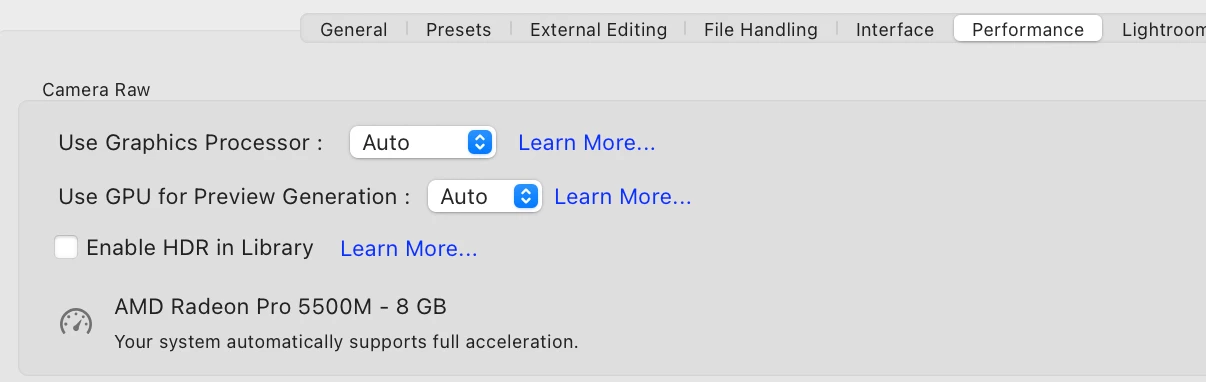
 

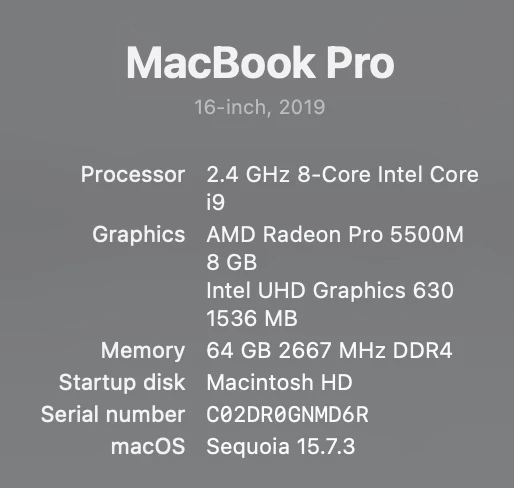
Have the following MacBook:   


Appreciate the suggestions how to resolve the issue.  

Correct answer johnrellis

Over the past year or so, there have been many posts here of problems with the Radeon 500- and 5000-series graphics processors on Intel Macs.  Many but not all of the problems have been fixed by updating the graphics driver by updating to the latest version of Mac OS.  You’re on Mac OS 15.7.3, so updating to the latest version of Mac OS (currently 26.2), you may get a new graphics driver that fixes the issue.  But beware that neither Apple nor AMD have much interest in fixing issues with AMD graphics drivers, since AMD doesn’t sell GPUs to Apple any more, and Apple just wants Intel Macs to go away.


Another thing to try: Your computer has an Intel integrated GPU. Adobe recommends disabling it, as described in step 5:

https://helpx.adobe.com/lightroom-classic/kb/troubleshoot-gpu.html#solution-4


3 replies

johnrellis
Legend
January 28, 2026

@Shots By Scott What is unique to the Dehaze feature that is causing LR to not work properly?  It may have something to do with the GPU has I have read.  However, what about other tools I use in the Develop module?  I do not have any issues with these.  


Each tool uses the GPUs’ capabilities in unique ways. GPUs are complicated beasts, and graphics drivers have many bugs (which is why manufacturers release new versions once or twice a month).  Over the year, there are many posts here describing how most of LR’s tools work well but one or two fail, until a new driver is released.

johnrellis
johnrellisCorrect answer
Legend
January 27, 2026

Over the past year or so, there have been many posts here of problems with the Radeon 500- and 5000-series graphics processors on Intel Macs.  Many but not all of the problems have been fixed by updating the graphics driver by updating to the latest version of Mac OS.  You’re on Mac OS 15.7.3, so updating to the latest version of Mac OS (currently 26.2), you may get a new graphics driver that fixes the issue.  But beware that neither Apple nor AMD have much interest in fixing issues with AMD graphics drivers, since AMD doesn’t sell GPUs to Apple any more, and Apple just wants Intel Macs to go away.


Another thing to try: Your computer has an Intel integrated GPU. Adobe recommends disabling it, as described in step 5:

https://helpx.adobe.com/lightroom-classic/kb/troubleshoot-gpu.html#solution-4


Shots By Scott
Participant
January 27, 2026

Thanks John.  I will take a look at the link you shared.  

Shots By Scott
Participant
January 28, 2026

What is unique to the Dehaze feature that is causing LR to not work properly?  It may have something to do with the GPU has I have read.  However, what about other tools I use in the Develop module?  I do not have any issues with these.  

creative explorer
Community Expert
Community Expert
January 27, 2026

@Shots By Scott Honestly, I had re-read and look at the specs carefully… I think it has to do with graphics card AMD 8 gigs — with Lightroom, I think you would need more power. Are you using dual monitors? Then that 8 gig is split into two as well, which probably slows things down a bit. 

m
Shots By Scott
Participant
January 27, 2026

I have a Dell monitor and normally keep the Macbook lid closed so I believe I am only using one monitor.  

After my post I noticed there was a new version of Lightroon and installed 15.1.1.  I started LR and still had the issue with dehaze.  I restarted the Mac and now there is no issue.  This is what have seen in the past. I have had the dehaze issue off and on for a few years.  

creative explorer
Community Expert
Community Expert
January 27, 2026

@Shots By Scott eventually, your Intel will no longer be able to sustain the newer Lightroom. And if cost is an issue, you could also use Lightroom on the web too. I am waiting on the M6 now. No point in getting the M5, if the M6 will release in 7 months after the M5! 

m