January 6, 2026
Answered

The "edit" button has dissappeared.

  • January 6, 2026
  • 3 replies
  • 253 views

I was editing today and the right panel would disappear immediately I moved the curser onto the photo, I could get it back by moving the curser all the way to the right and coming on to the panel from the right. Now " edit" has disappeared completely, there is no longer an "edit' after library on the top right.  Can anyone advise me what to do?  Many thanks,  Don.

Correct answer JohanElzenga

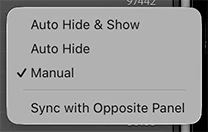
If this ever happens again, then don't uninstall/reinstall, but right-click on the right edge of the panel. You will get a menu where you can select the behavior of the panel. Set it to 'Manual'. You (inadvertently) switched it to 'Auto Hide & Show'.


1 2026-01-07 13-59-53.jpg


3 replies

JohanElzenga
Community Expert
JohanElzengaCommunity ExpertCorrect answer
Community Expert
January 7, 2026

If this ever happens again, then don't uninstall/reinstall, but right-click on the right edge of the panel. You will get a menu where you can select the behavior of the panel. Set it to 'Manual'. You (inadvertently) switched it to 'Auto Hide & Show'.


1 2026-01-07 13-59-53.jpg


-- Johan W. Elzenga
don_4770Author
January 8, 2026

Thanks Johan.

don_4770Author
January 7, 2026

Hello Tarun, 

Thanks for getting back to me.  After I wrote to you/the forum, I uninstalled and reinstalled. It fixed that problem as "Develope" has reappeared.  However, after reinstall there was a warning that some catalogs were saved as a zip and some could not be used on, I think older versions.  I believe i have messed up here and ticked the wrong option. I automatically get an old catalog, and can't find the one I am currently using, all my latest photos. 

I am using Lightroom Classic on my laptops, and will include a couple of photos in case they help. Many thanks,  Don.

kglad
Community Expert
Community Expert
January 7, 2026

p.s. don't attach screenshots.  copy and paste them into your post.

Tarun Saini
Community Manager
Community Manager
January 6, 2026

Hi @don_4770,


Thanks for reaching out! Could you please let us know the name of the Adobe app you are using? If possible, can you share a screen recording of the issue to assist you better?


We're here to help, just need some info.


Regards,

Tarun