Participant
Nov 24, 2024 6:45 AM UTC
Answered

The Lightroom catalog cannot be opened because it is too new to be used by this version

Hi there,

I have been using Lightroom Classic on my iMac 2015 model for almost 9 years, and I have one catalog that has everything on it.


I use an external drive that has both my catalogs and photos, and run Lightroom through that.


Recently I took the hard drive to work, and used it to run Lightroom on a 2022 model Macbook Pro to finish off some freelance work during my lunch break.


Back at home today, I tried to open my reglular catalog, but I got this message: 

The Lightroom catalog named “my catalog" cannot be opened because it is too new to be used by this version of Lightroom. Would you like to select a different catalog?


With my iMac being old, I am unable to update to the latest version of Lightroom, which my work MacBook Pro uses, and I am guessing its updated the catalog to that.


My questions are:

• Is there anyway to roll back the catalog so I can use it on my older iMac?

• If not, is there a way to salavge the catalog so I can use it on my older mac?

There is around 2 years of missing edited images from the last catalog I have before that, so if I can save it I would be so happy.


Any advice will be greatly appriecated!

This topic is closed to new replies. Start a new post to keep the conversation going.
Per Berntsen
Per BerntsenCorrect answer
Community Expert
Nov 25, 2024 12:09 AM UTC

LrC always upgrades a copy of the old catalog.

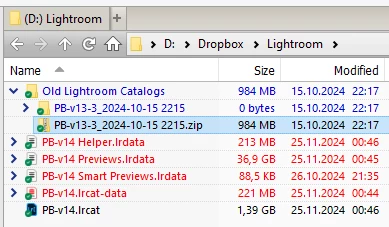
If the upgrade was done with LrC 14, there will be a folder named Old Lightroom catalogs inside the folder that contains the catalog. Inside this folder you'll find a zip file that contains the old catalog.

Unzip the file (preferably to a new location to avoid confusion), then double-click the catalog file to launch your old version of LrC.


4 replies

F. McLion
Community Expert
Community Expert
Nov 24, 2024 7:21 AM UTC

It has nothing to do with the age of the Mac. It has to do with the Version of Lightroom Classic. Once a catalog has been upgraded to work with a newer version, it can not be used with an older version of LrC.

They need to be forward-upgraded and are not backward-compatible.

That said, on the 2022 model, a newer version was installed, and your catalog has been upgraded, but not without a message showing to inform you, that you eventually ignored.


Translate
--- Got your issue resolved? Please label the response as 'Correct Answer' to help your fellow community members find a solution to similar problems. ---
Participant
Nov 24, 2024 11:05 PM UTC

Thanks, I thought that was the case that the catalog was upgraded. I wouldn't say 'ignored', but I've obviously missed it or not realised at the time the issues upgrading would cause for my home setup...


Is there a way to create a new catalog on the old computer and import the data? Or have I lost it all together to use on my older Mac? 

Translate
Per Berntsen
Community Expert
Per BerntsenCommunity ExpertCorrect answer
Community Expert
Nov 25, 2024 12:09 AM UTC

LrC always upgrades a copy of the old catalog.

If the upgrade was done with LrC 14, there will be a folder named Old Lightroom catalogs inside the folder that contains the catalog. Inside this folder you'll find a zip file that contains the old catalog.

Unzip the file (preferably to a new location to avoid confusion), then double-click the catalog file to launch your old version of LrC.


Translate