

doncow
Participating Frequently
June 1, 2023
Question

The Lightroom Catalog "Lightroom Catalog 2-v12" is corrupt . . .

  • June 1, 2023
  • 2 replies
  • 737 views

It goes on to say it cannot be used until it is repaired but it doesn't seem to either repair it, open the Lightroom so I can repair from there, or provide any other method of repairing the application. HELP!
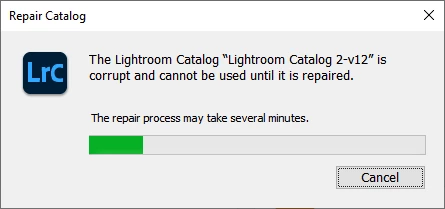


I have gone into the user file and changed the MCAT file to OLD, that didn't work either. I an uninstalled and reinstalled. I really don't care about the catalog because I keep everything backed up on OneDrive. I will really appreciate a solution.

This topic has been closed for replies.

2 replies

dj_paige
Legend
June 1, 2023

You need to restore a recent backup copy of your LrC catalog.

Rikk Flohr_Photography
Community Manager
June 1, 2023

MCAT files are Lightroom Desktop Catalogs

The Dialog you have is for Lightroom Classic which uses an .LRCAT file - a completely different application.  Storing Lightroom Catalogs on a syncing service like Onedrive is a recipe for corrupting a catalog. 


Contact support to have your catalog repaired.

Your issue can best be resolved by contacting Adobe Customer Care at https://helpx.adobe.com/contact/what-contact-options.html. Scroll to the bottom and click on the “Start Now” live chat link in the lower right of this page. Typing “Agent” into the chat text field will bypass the initial chat bot.


Rikk Flohr: Adobe Photography Org