Participating Frequently
May 7, 2018
Answered

The new default profiles in LR Develop Basic panel have disappeared.

  • May 7, 2018
  • 3 replies
  • 980 views

I was using the Color Profile Portrait, and Color Profile Vivid in the LR Develop Basic Panel, but then those profiles disappeared.  I would like to find then again and put them back where they belong.

How do I find the missing profiles?  When I click the 4 boxes, they are not anywhere to be found in all of those profiles.

I am using LR 7.3.1 and Camera Raw 10.1

Thanks!
    This topic has been closed for replies.
    Correct answer ssprengel

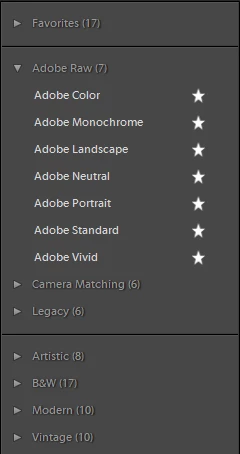
    Here I've set the profile browser view option to List so it's easy to see how many profiles there are in each category.

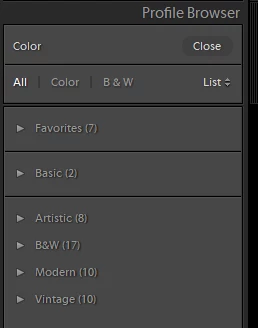
    You may be looking at a non-raw image, like a JPG, TIF or PSD, so you'll only see the profiles that aren't raw-specific, like for a JPG:

    Or what do you mean you've clicked in the 4 boxes, because there are more than four sections if you're looking at a RAW:

    3 replies

    Participating Frequently
    May 7, 2018

    BINGO!  Thank you ssprengel !

    I had updated my photo from a .dng to a .tif after I edited in Photoshop. 

    Now to find out how to get a .dng out of photoshop in addition to a tif.

    Rob_Cullen
    Community Expert
    Community Expert
    May 7, 2018

    When you select a DNG (raw) file to "Edit In Photoshop" you are creating a new TIFF file. You are not updating anything.  The new TIFF file will open in Photoshop with any develop adjustments you made to the DNG in Lightroom.

    You have no need to "get a .dng out of photoshop"  because your original DNG file is untouched by Lightroom and still visible in the Catalog library with any edits stored in the Catalog.

    Can you explain in more detail what you are trying to achieve?

    Regards. My System: Windows-11, Lightroom-Classic 15.4.1, Photoshop 27.8, ACR 18.4, Lightroom 9.4, Lr-iOS 10.4.0, Bridge 16.0.3 .
    ssprengel
    ssprengelCorrect answer
    Inspiring
    May 7, 2018

    Here I've set the profile browser view option to List so it's easy to see how many profiles there are in each category.

    You may be looking at a non-raw image, like a JPG, TIF or PSD, so you'll only see the profiles that aren't raw-specific, like for a JPG:

    Or what do you mean you've clicked in the 4 boxes, because there are more than four sections if you're looking at a RAW:

    DdeGannes
    Community Expert
    Community Expert
    May 7, 2018

    Something is strange here, if you have LR 7.3.1 open then you should see that it has Camera Raw 10.3 functions see the screen capture. You are probably have Lightroom 7.1  open which does not have the new profiles.

    Regards, Denis: Laptop Win 11, ver 24H2, LrC 15.4 PS 27.8;