Answered
The people icon is missing
The people icon at the bottom of the screen is no longer there. I have clicked on every darn menu option and can't find a way to bring it back. Thanks in advance for your help 🙂

The people icon at the bottom of the screen is no longer there. I have clicked on every darn menu option and can't find a way to bring it back. Thanks in advance for your help 🙂
[This post contains formatting and embedded images that don't appear in email. View the post in your Web browser.]
1. Make sure you're in Library.
2. Make sure the toolbar is showing at the bottom by doing View > Show Toolbar (first item in the View menu; keyboard shortcut shown there).
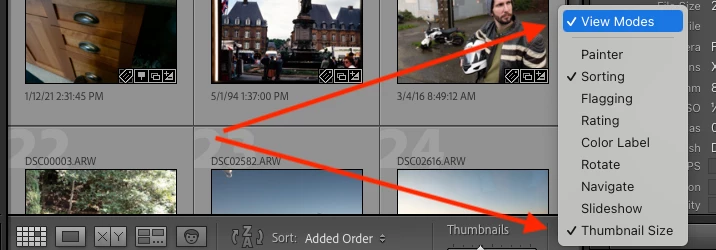
3. If you don't see the four view-mode icons, including the People icon:

click the dropdown down-arrow at the right end of the toolbar and select View Modes:
Already have an account? Login
Enter your E-mail address. We'll send you an e-mail with instructions to reset your password.
 AdChoices