mikaels71195823
Inspiring
February 3, 2018
Question

The photos twist in the lightroom

  • February 3, 2018
  • 2 replies
  • 1306 views

The photos twist in the lightroom and bridge after i installed the Adobe package because of reformatting the computer.
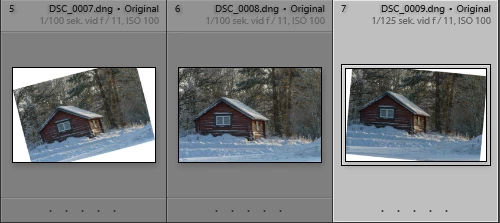
In bridge:
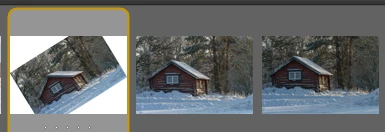
But in LR Import they look like this:
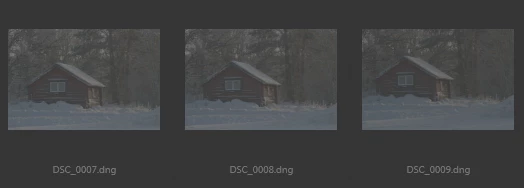
But when I'll try to reimport them they twist, and I see in other folders with photos from 2012 and forward between 1-5 images are twisted.

Regards Micke S

    This topic has been closed for replies.

    2 replies

    Just Shoot Me
    Legend
    February 3, 2018

    Those 2 images that are twisted have been done so outside of LR. More than likely in PS. They have had a background added and the image skewed.

    The name of the images are different than the screen shot you showed of the grayed out images from the import dialog in LR. They have Original added to them.

    These are clearly images that you have increased the canvas on, added a white background and skewed the images then imported them back into LR.

    LR has no ability to skew an image and add a white background. If you use the Crop tool to rotate an image it auto crops parts out that are outside the cropped area. Like this.

    JP Hess
    Inspiring
    February 3, 2018

    Yeah, I have been thinking about that since I first commented. You are right. They had to be skewed using another program.

    JP Hess
    Inspiring
    February 3, 2018

    You need to provide more information. I have never seen "twisted" images like that imported using Lightroom before. The third screenshot that you provided where the images are grayed out, is a typical display in the import dialog where the images have already been imported. But I don't understand the others at all.

    mikaels71195823
    Inspiring
    February 3, 2018

    The pictures had turned, but I found the error. Panel "Free Transform" had "automatically" selected.

    Best regards: Micke Seise
    Hal P Anderson
    Inspiring
    February 3, 2018

    Somehow you are automatically applying one of the Transform transformations at input. You are either applying a preset in the Import Dialogue, or you have a Default set. Make sure that a preset applied in the Import dialogue's Develop Settings isn't applying a Transform.

    The other possibility is that you have a Develop Default set. You can make that go away by holding down the Alt (Opt on Mac) key and notice that the Reset button on the lower right of the Develop module changes to "Set Default...". Press that button and in the dialogue box that comes up, choose Restore Adobe Default Settings. Your future imports won't come in twisted.