
There is a wrong file connection and I am getting an error message when trying to show or hide parent files.
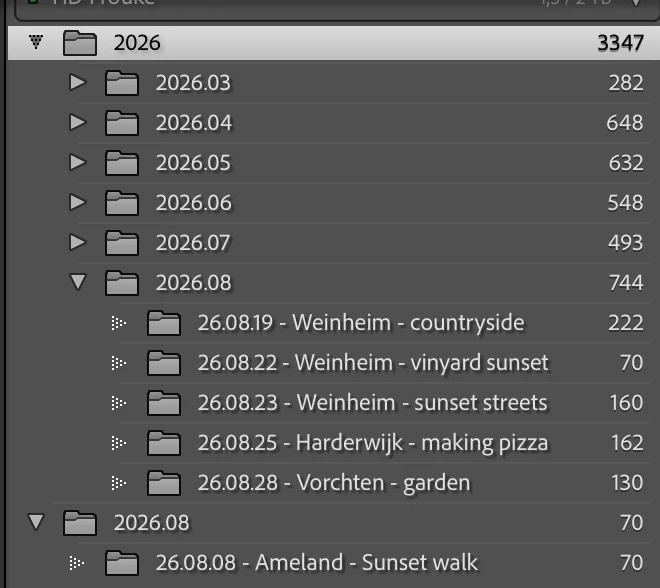
I was changing around some things within Lightroom files last week and thought everything was done correctly. But today I saw that there is a wrong connection. In am working on a Mac. In finder, my folder structure is this: 2026 → 2026.08 → other folders. But in Lightroom, there are two 2026.08 folder. One is within the 2026 parent folder, containing other folders. But there is also a separate 2026.08 folder, which contains only one other folder (2026.08.08 - Ameland - sunset walk). In finder, this is all under the same 2026 → 2026.08 folder. There is another problem. When I click on show or hide a parent folder, I am getting this error message:
Database "/Volumes/HD Frouke/Lightroom backup/2026-10-01 1214/Lightroom Catalog/Lightroom Catalog backup 01-10.26 1.lrcat": UNIQUE constraint failed: AgLibraryFolder.rootFolder, AgLibraryFolder.pathFromRoot
sql: UPDATE AgLibraryFolder SET rootFolder = ?,pathFromRoot = ? WHERE id_local = ?; (error code 2067)
I have tried many different things in my original Lightroom catalog, but ended up messing everything up. Luckily I made a couple of backups before I started doing this. How do I make sure that the connections are correct and that I don’t get this error message anymore?


 AdChoices