
Thumbnails do not load during import
Good morning all,
Recently upgraded my monitor (3440x1440) and have also upgraded my GPU (4070 Super) but since doing so, Lightroom runs at an incredibly slow speed. It doesn't load thumbnails during import, and even when imported, there's no thumbnails.
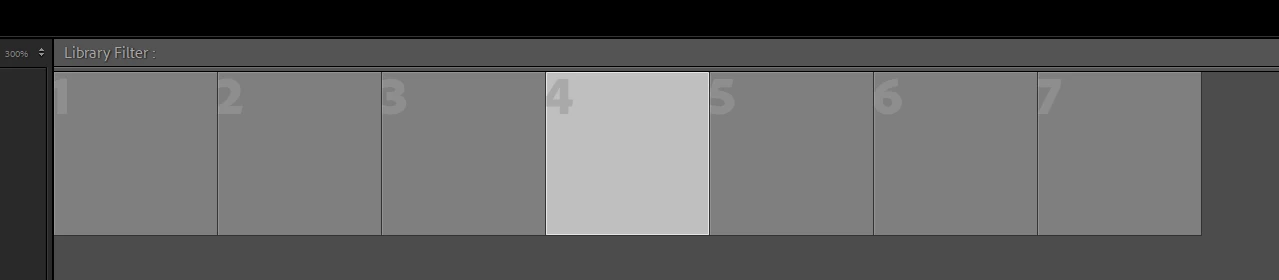
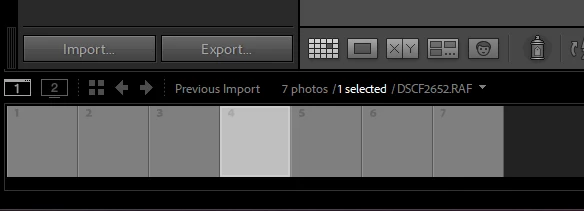
I've done everything I can think of, including rolling back to 12.5 and doing an entirely fresh install of 14.0.1, but still, there's not difference.
It almost paints the window in brushstrokes when loading as well.
Thank you so much for your help
Please see my system info below.
Lightroom Classic version: 14.0.1 [ 202410161356-30922cfc ]
License: Creative Cloud
Language setting: en
Operating system: Windows 11 - Business Edition
Version: 11.0.22631
Application architecture: x64
System architecture: x64
Logical processor count: 16
Processor speed: 3.4GHz
SqLite Version: 3.36.0
CPU Utilisation: 0.0%
Power Source: Plugged In
Built-in memory: 65462.0 MB
Dedicated GPU memory used by Lightroom: 2537.9MB / 11999.0MB (21%)
Real memory available to Lightroom: 65462.0 MB
Real memory used by Lightroom: 944.1 MB (1.4%)
Virtual memory used by Lightroom: 6219.4 MB
GDI objects count: 1129
USER objects count: 2364
Process handles count: 3056
Memory cache size: 3511.2MB
Internal Camera Raw version: 17.0 [ 2043 ]
Maximum thread count used by Camera Raw: 5
Camera Raw SIMD optimization: SSE2,AVX,AVX2
Camera Raw virtual memory: 1049MB / 32731MB (3%)
Camera Raw real memory: 1260MB / 65462MB (1%)
Cache1:
Final1- RAM:213.0MB, VRAM:1421.0MB, DSCF2652.RAF
Final2- RAM:204.0MB, VRAM:13.0MB, DSCF2650.RAF
NT- RAM:417.0MB, VRAM:1434.0MB, Combined:1851.0MB
Cache2:
m:3511.2MB, n:408.3MB
U-main: 105.0MB
System DPI setting: 96 DPI
Desktop composition enabled: Yes
Standard Preview Size: 1440 pixels
Displays: 1) 3440x1440, 2) 1440x2560
Input types: Multitouch: No, Integrated touch: No, Integrated pen: Yes, External touch: No, External pen: No, Keyboard: No
Graphics Processor Info:
DirectX: NVIDIA GeForce RTX 4070 SUPER (32.0.15.6614)
Init State: GPU for Export supported by default
User Preference: Auto
Enable HDR in Library: OFF
Application folder: C:\Program Files\Adobe\Adobe Lightroom Classic
Library Path: E:\catcat\catcat.lrcat
Settings Folder: C:\Users\macki\AppData\Roaming\Adobe\Lightroom
Installed Plugins:
1) AdobeStock
2) Flickr
Config.lua flags:
Adapter #1: Vendor : 10de
Device : 2783
Subsystem : 18ca10de
Revision : a1
Video Memory : 11999
Adapter #2: Vendor : 1414
Device : 8c
Subsystem : 0
Revision : 0
Video Memory : 0
AudioDeviceIOBlockSize: 1024
AudioDeviceName: System Default - Speakers (3- SMSL AD-18 Amplifier )
AudioDeviceNumberOfChannels: 2
AudioDeviceSampleRate: 48000
Build: LR5x26
Direct2DEnabled: false
GL_ACCUM_ALPHA_BITS: 16
GL_ACCUM_BLUE_BITS: 16
GL_ACCUM_GREEN_BITS: 16
GL_ACCUM_RED_BITS: 16
GL_ALPHA_BITS: 0
GL_BLUE_BITS: 8
GL_DEPTH_BITS: 24
GL_GREEN_BITS: 8
GL_MAX_3D_TEXTURE_SIZE: 16384
GL_MAX_TEXTURE_SIZE: 32768
GL_MAX_TEXTURE_UNITS: 4
GL_MAX_VIEWPORT_DIMS: 32768,32768
GL_RED_BITS: 8
GL_RENDERER: NVIDIA GeForce RTX 4070 SUPER/PCIe/SSE2
GL_SHADING_LANGUAGE_VERSION: 4.60 NVIDIA
GL_STENCIL_BITS: 8
GL_VENDOR: NVIDIA Corporation
GL_VERSION: 4.6.0 NVIDIA 566.14
GPUDeviceEnabled: false
OGLEnabled: true
[moved from bugs to discussions according to the community rules and shortened system info to relevant part - Mod.]
 AdChoices