



mauricep49265357
Participant
April 28, 2026
Answered

Title Mac Studio M1 Ultra – GPU not recognized, Denoise not available (works on MacBook)

  • April 28, 2026
  • 1 reply
  • 39 views

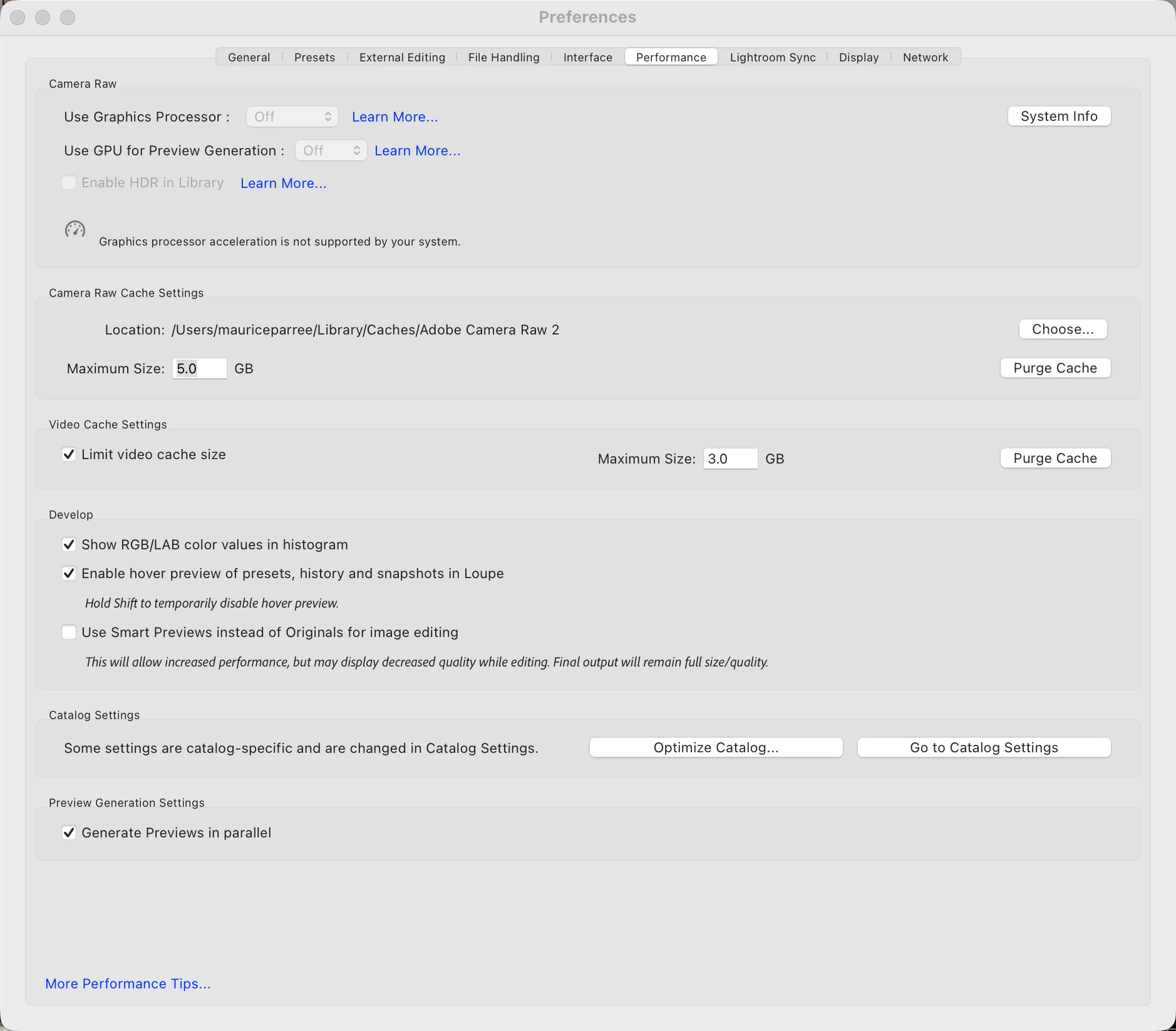
I have a reproducible issue where Lightroom Classic (15.3) does not recognize the GPU on my Mac Studio (M1 Ultra).  macOS 26.4.1 GPU shows 0.0 MB / not supported “Use GPU” is greyed out Denoise returns: “Requested adjustment is not applicable”  Important: The exact same setup works on a MacBook (same macOS, same LR version, same files). GPU is recognized and Denoise works there.  Already tried:  Reset preferences Clean reinstall Cleared Camera Raw cache Tested with single display  System reports GPU + Metal correctly (system_profiler).  → Seems Lightroom fails to detect GPU on this Mac Studio only.  Anyone seeing the same on Mac Studio?


    Correct answer Sameer K

    Hey, @mauricep49265357. Welcome to the Lightroom Classic Community. I'll help you figure this out. Please share the system info from Lightroom Classic > Help > System info > Copy & paste into a text document > upload & attach here.


    Try these steps to clear the GPU Logs: 

    • On Mac, the location is: ~/Library/Application Support/Adobe/CameraRaw

    • Hold down the Option key in the Finder when using the Go menu. The library will appear below the current user's home directory.

    • In this folder, delete the ‘GPU’ & ‘Logs’ folders.

    • Launch Lightroom Classic.


    Thanks! 
    Sameer K

    (Type '@' and type my name to mention me when you reply)

    1 reply

    Sameer K
    Community Manager
    Sameer KCommunity ManagerCorrect answer
    Community Manager
    April 28, 2026

    Hey, @mauricep49265357. Welcome to the Lightroom Classic Community. I'll help you figure this out. Please share the system info from Lightroom Classic > Help > System info > Copy & paste into a text document > upload & attach here.


    Try these steps to clear the GPU Logs: 

    • On Mac, the location is: ~/Library/Application Support/Adobe/CameraRaw

    • Hold down the Option key in the Finder when using the Go menu. The library will appear below the current user's home directory.

    • In this folder, delete the ‘GPU’ & ‘Logs’ folders.

    • Launch Lightroom Classic.


    Thanks! 
    Sameer K

    (Type '@' and type my name to mention me when you reply)

    mauricep49265357
    Participant
    April 29, 2026

    Thanks Sameer, that worked!
