


Participant
November 13, 2025
Answered

Tone Curve inversion

  • November 13, 2025
  • 1 reply
  • 128 views

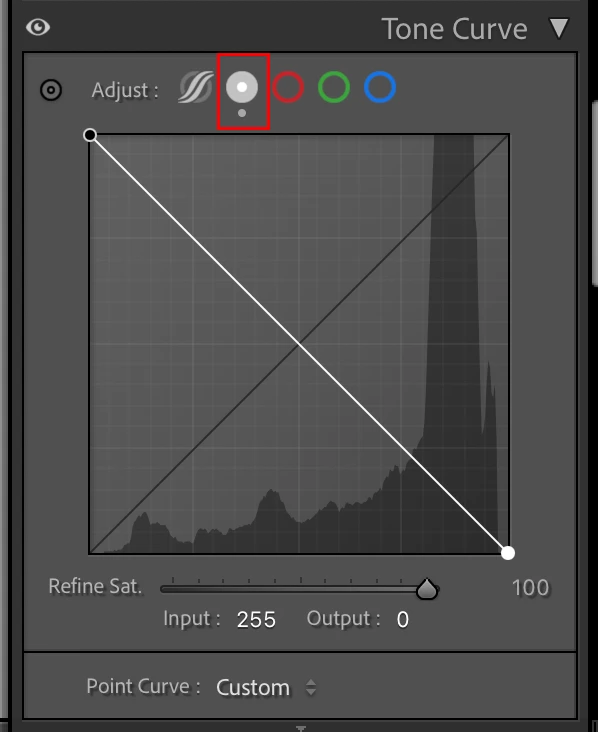
I am scanning negatives using DSLR. Today I updated Lightroom Classic to version 15.0.1 and cannot now invert Tone Curve as I used to do earlier. In Tone Curve panel I am not able to drag left bottom point to upper corner and same with upper right corner point to bottom. I am using Macbook Pro with macOS 15.6.1. Am I doing something wrong?

Correct answer Ian Lyons

You need to switch to the Point Curve as shown on attached screenshot


1 reply

Community Manager
November 13, 2025

Hi @Samil_9805, welcome to the community!
I tried reproducing this on my end but haven’t had any luck. Can you share a screen recording of the issue?

As a first step, could you try resetting your preferences and see if that helps? You can follow the steps in this guide:
https://adobe.ly/4hUVkIa
Thanks a lot!
Alek

*(If you mention me with an @, like @Aleke, I’ll get a notification and can respond faster.)*
Participant
November 14, 2025

Hi @Aleke ,

I resetted preferences and still no change. Attached screen shot of  Tone Curve module which I took before resetting preferences. It is aftere reset the same. Module does not offer any possibility to select between Region Curve / Point Curve. No icons for that.

Thanks a lot,

Samil

Ian Lyons
Community Expert
Ian LyonsCommunity ExpertCorrect answer
Community Expert
November 14, 2025

You need to switch to the Point Curve as shown on attached screenshot