

edwardw16699964
Participant
May 11, 2020
Question

Tone Curve, white/black points, 9.2.1 MAC

  • May 11, 2020
  • 4 replies
  • 2228 views

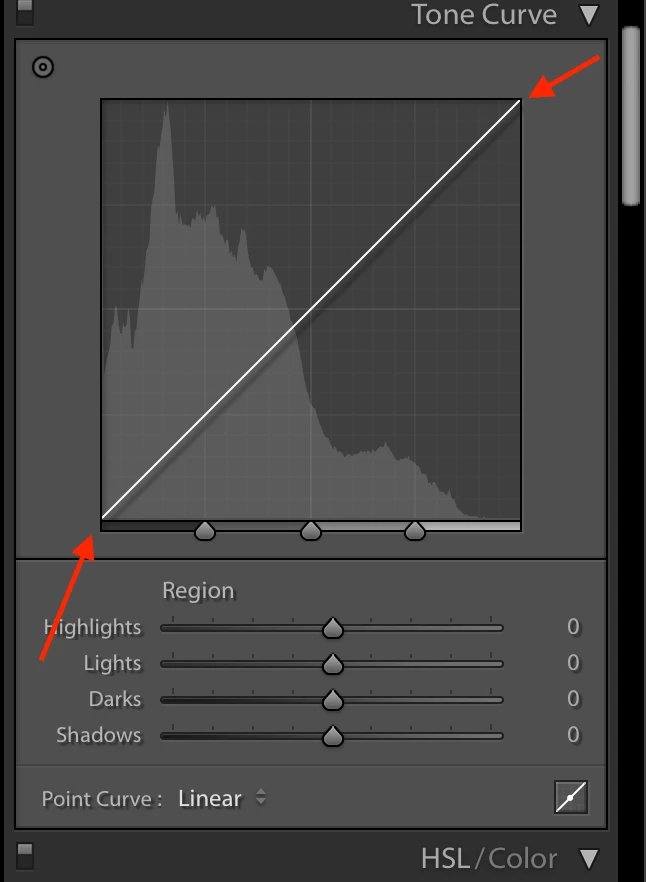
Since updating to LR Classic 9.2.1 (mac) I can't adjust white and black points in the tone curve, what am I missing? Adjusting the shadows, midtones & highlights works as normal, but the end points won't move.

I also can't access the RGB channels. I am running Process version 5 (current)
 

This topic has been closed for replies.

4 replies

GoldingD
Legend
May 11, 2020
GoldingD
Legend
May 11, 2020

Oh, and did you first click on the curve to create a handle, or are you just clicking down and dragging?


and see:


"When in the 'region' mode, you have never been able to add any points to the curve. Points can only be added to the curve by clicking the small Point Curve button in the lower right of the Tone Curve panel.  If the button is depressed, points can be added. If it is not depressed, points cannot be added. "


https://feedback.photoshop.com/photoshop_family/topics/lr-adding-point-to-tone-curves-does-not-work


https://feedback.photoshop.com/photoshop_family/topics/tone-curve-ends-not-working-in-lightroom


GoldingD
Legend
May 11, 2020

/EDIT/ See my next reply before acting on this reply


Sounds like a canadate for resetting the preference file. Resetting the preference file is Adobe speak for deleating the preference file and then letting Lightroom Classic to recreate it.


The preference file can get corrupted, resulting in odd behavior. Some people have a knee jerk reaction in thinking they need to uninstall then reinstall Lightroom Classic, maybe that could be called for, but it would be better to first reset the preference file.


Be aware that resetting the preference file will result in Lightroom Classic creating a new catalog instead if opening your previously opened catalog (normally) so make sure you know where your catalog is. 


Be aware the resetting the preference file will revert some settings in Preferences to defaults. So be aware of what you have changed, so that you can put those back the way you want them.


some links:


https://lightroomers.com/replacing-the-lightroom-preference-file/745/


https://www.youtube.com/watch?v=bARt-hoCc2Q


https://helpx.adobe.com/lightroom-classic/help/setting-preferences-lightroom.html


https://helpx.adobe.com/lightroom-classic/kb/recover-catalog-images-resetting-lightroom.html


dj_paige
Legend
May 11, 2020

I don't think this is a change. In the view you are showing, you cannot move the endpoints or access RGB channels. If you click on the curve-shape icon at the bottom right, then you can change the endpoints, and you can access the RGB channels. As far as I remember, this is the way it has worked in recent versions.

edwardw16699964
Participant
May 11, 2020

Clicking the little curve-shaped icon in the lower right does not permit adjusting the endpoints or access RGB. Clicking it only hides/reveals the Region (Highlights, Lights, Darks, Shadows) and diplays the point curve menu options. Nothing more. Please advise.


dj_paige
Legend
May 11, 2020

Well, on my computer (Windows 10) using LR 9.2.1, clicking on the curve icon at the bottom right does allow the RGB curves to appear and allows the moving of the end points.


If it doesn't do that for you, then you might want to try resetting your preference file. https://www.lightroomqueen.com/how-do-i-reset-lightrooms-preferences/