

Tracklogs and timezones
This is reporting a bug in Lightroom classic 13.1 build 202312111226-41a94e8 on Windows 11.
I recently returned from a European river cruise and ran a tracker on my iPhone and Apple Watch to gather tracklogs for the trip. That worked out fine. The program, Geotag Photos 2, created a GPX file and I verified that it matches the GPX schema, with latitude, longitude, and UTC timestamp for each logged point.
There are some serious problems in using this with Lightroom classic, however:
- The GPX tracklog contains timestamps in UTC, per the GPX XML schema. For most of Europe, that's an offset of +1 hour over UTC. However, when I load the tracklog for each day of my trip into Lightroom, it converts to local time: currently UTC-6 for my location in Texas.
- For example, in the map module, if I hover over a portion of the track near an already timestamped photo that shows 11:04AM, the tracklog reports 5:03AM (see attached image--off by 1 minute is ok). This is the UTC timestamp of the tracklog converted into my local time.
- The tracklog GPX file contains a comment at the start of each track giving the timezone offset from UTC time in minutes. For this track it says +3600, which is UTC+1 and is correct.
Is this something that Lightroom is supposed to be able to process?There's nothing in the GPX schema to specify a timezone offset, which is unfortunate but I was wondering if this was some kind of extension.
- The tracklog GPX file contains a comment at the start of each track giving the timezone offset from UTC time in minutes. For this track it says +3600, which is UTC+1 and is correct.
- If I use the "Track Time Offset" function to add 6 hours to the time that's displayed when I hover over the tracklog (basically specifying local time where the photo was taken), it has no effect on the timestamps displayed when I hover.
- See this screen capture. The photo was timestamped by my camera at 11:04:26 (the actual time the photo was taken), while hovering over the tracklog where the photo was taken shows 5:03:23, which is the UTC time stored in the GPX file, adjusted to my local timezone.
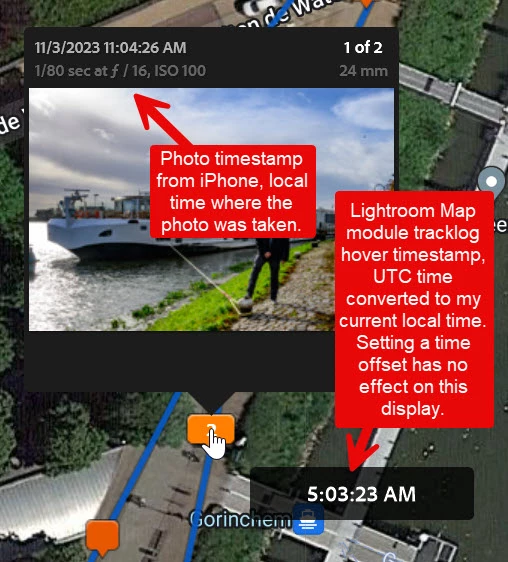
- The Lightroom BUG is that "Track Time Offset" has no effect over the timestamp displayed when I hover over the tracklog.
- See this screen capture. The photo was timestamped by my camera at 11:04:26 (the actual time the photo was taken), while hovering over the tracklog where the photo was taken shows 5:03:23, which is the UTC time stored in the GPX file, adjusted to my local timezone.
I'm thinking that Lightroom really needs an option to not convert an imported GPX tracklog to local time, but to leave it in UTC time. Having to apply TWO adjustments: back to UTC time, and then to the timezone where the tracklog was recorded is just too confusing for us mere mortals. It's as if Lightroom assumes you only collect tracklogs in your home timezone.
Also, Lightroom does not seem to save the entered tracklog offset anywhere. When I reload the tracklog, everything is reset to local time again. So I'm thinking the only way to reliably store a GPX tracklog for later use in LIghtroom is to convert the UTC times in the tracklog so it's relative to the local timezone -- then I could load it at will to see the track I took when I walked in each city. However, this just seems wrong to me.
I uploaded a sample tracklog. I can't upload a GPX file so I added a .XML extension. Change it back to .GPX or Lightroom can't see it.
There is another annoying bug in GPX file handling, but I'll report that as a separate issue.


 AdChoices