
"treat jpeg files next to raw files as separate photos" not working
I've been using Lightroom since 1.0 and have used this feature many times, but in Lightroom CC Classic 8.0.1193777 there appears to be a regression bug.
My goal is to SEPARATE JPG files from their NEF counterparts but Lightroom won't stack them.
I've tried checking "treat jpeg files next to raw files as separate photos" and rebooting Lightroom, but no luck.
I've tried selecting and unstacking, but no luck - unstacking is disabled even from the library folder view
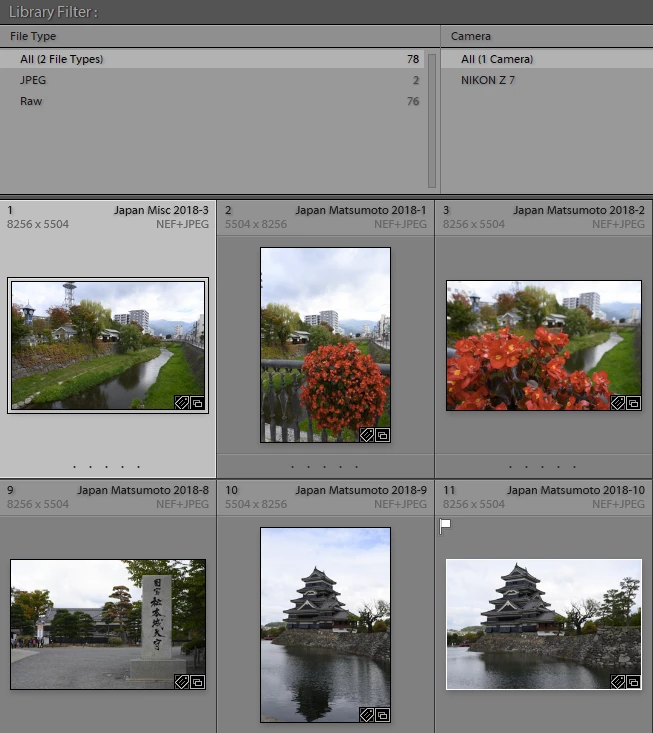
I've tried going to the library view and showing the metadata filter and trying to separate them using File Type as I've done since metadata filtering first became available in Lightroom, but it doesn't recognize the JPEG's as shown here:
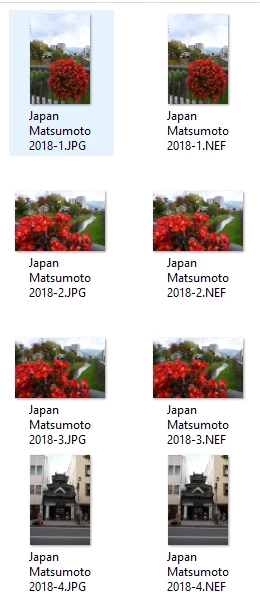
As you can see here in Explorer though, there are clearly JPEG versions of the file:
Stacking | Expand All Stacks didn't work either.
This used to work, but something seems broken in this build of Lightroom CC Classic.
Please advise as I need to separate out the original JPEG's to use in an article I'm writing.
Thanks,
Ron
 AdChoices