Participant
December 3, 2024
Answered

Trying to buy Lightroom Classic (desktop version)

  • December 3, 2024
  • 2 replies
  • 463 views

On Adobed's site I follow the Lightroom Purchase link and it then gets to the $9.99/month page, but for the cloud version. How do I buy the desktop version?

This topic has been closed for replies.
Correct answer GoldingD

Appears to be some issue at that web page.


Try this page:


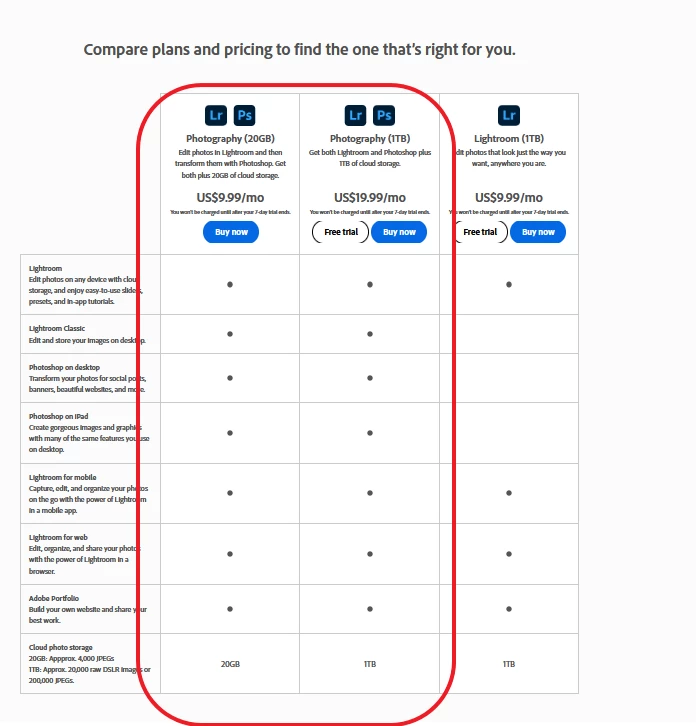
https://www.adobe.com/creativecloud/photography/compare-plans.html


2 replies

dj_paige
Legend
December 3, 2024
Participant
December 3, 2024

Thanks for the rey. Your link takes me to a page that has 2 versions of LR, cloud based, one 1Tb and one 20Tb. This is not the one I want. I was looking for Lightroom Classic (desktop with catalog) where all the work is locally on yoyr desktop and not in the cloud. 

GoldingD
GoldingDCorrect answer
Legend
December 3, 2024

Appears to be some issue at that web page.


Try this page:


https://www.adobe.com/creativecloud/photography/compare-plans.html


GoldingD
Legend
December 3, 2024

You need to look at what Adobe Plan you are selecting. Now the Lightroom Plan, as you are noting is just Lightroom, and by that they mean the cloud version. Look at the Photography Plan, that one includes PS, Lr, LrC (the one you want) , Bridge, and PS on the  iPad (I think). It comes in two sizes of Cloud Storage (most of us just go for the 20 GB and then do not use it). Oh, and No, their is no LrC only Plan.


Participant
December 3, 2024

So further down the line they let you pick the version you want?