brooklyn108111293
Participant
October 12, 2017
Answered

Trying to download a photoshop preset into lightroom

  • October 12, 2017
  • 1 reply
  • 621 views

Hi!  I was given a preset through email that was made in photoshop cc and the file type is .xmp ( not sure if this is important if I'm being honest), I have followed the directions to put it in the lightroom  preset files on my computer and have follow the pc directions to download it onto lightroom however it's not coming up.  I'm not sure if it's because I just missed a step or if it's not even possible what I'm trying to do.  Please help!
This topic has been closed for replies.
Correct answer Per Berntsen

The xmp file contains the edits that were done to the corresponding image (same file name) in Camera Raw.

So for each edited image there will be a corresponding xmp file in the same folder as the image.

For instance image1.nef and image1.xmp.

Lightroom only writes the edits to a central catalog file, but can create xmp files if you tell it to, and can also read xmp files and apply the corresponding edits to the image. For that to happen, the image and the xmp file must be in the same folder, and you must import the image. So you need to have the image as well as the xmp file to see the edits.

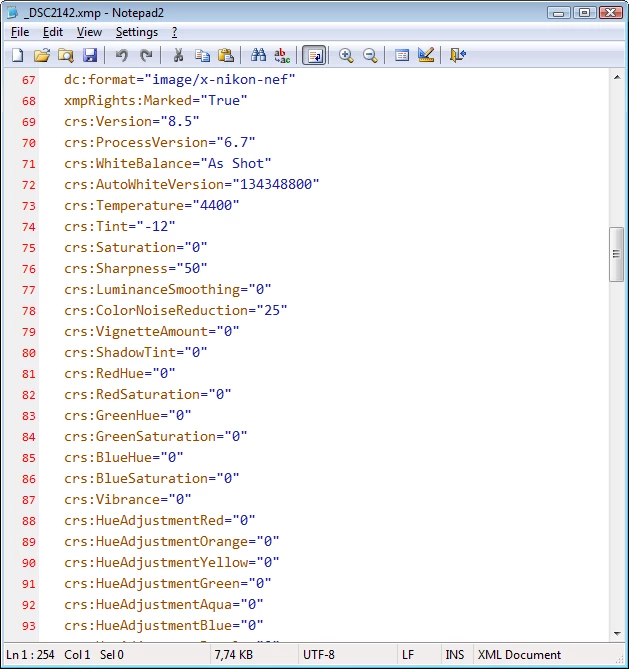
Alternatively, you can open the xmp file in a text editor, and see what adjustments have been applied.

All the adjustment entries begin with crs:

They are relatively easy to understand, but if you're new to Lightroom, it would probably be better to have the image in Lightroom.

1 reply

john beardsworth
Community Expert
Community Expert
October 12, 2017

It's probably not a preset.

Ask the other person to send you the corresponding image as well, then in Explorer/Finder put the xmp and image into the same folder. Now import the image into LR. It will come in with the adjustments defined in the xmp file. You can now save your own preset.

brooklyn108111293
Participant
October 12, 2017

When you say ask for corresponding image what does that mean?  When you export it into lightroom do you export just the image or the file holding  both the image and xmp file?  Sorry if I’m slow to catching on this is just so new to me!  I so appreciate your help!

Per Berntsen
Community Expert
Per BerntsenCommunity ExpertCorrect answer
Community Expert
October 12, 2017

The xmp file contains the edits that were done to the corresponding image (same file name) in Camera Raw.

So for each edited image there will be a corresponding xmp file in the same folder as the image.

For instance image1.nef and image1.xmp.

Lightroom only writes the edits to a central catalog file, but can create xmp files if you tell it to, and can also read xmp files and apply the corresponding edits to the image. For that to happen, the image and the xmp file must be in the same folder, and you must import the image. So you need to have the image as well as the xmp file to see the edits.

Alternatively, you can open the xmp file in a text editor, and see what adjustments have been applied.

All the adjustment entries begin with crs:

They are relatively easy to understand, but if you're new to Lightroom, it would probably be better to have the image in Lightroom.