Trying to remove my "C" drive from lightroom list...
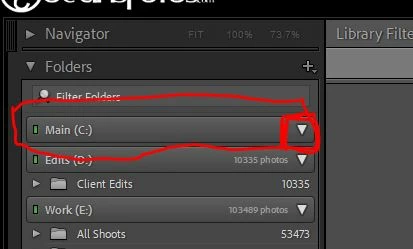
No matter what I try, my main OS drive (C:/) keeps appearing on my Folders list.
There are NO folders that contain images.
There are no images period for lightroom on that drive.
There is nothing the pops down when you click on the white arrow icon to expand.
Everytime I reopen Lightroom, it keeps putting the C drive back on the list.
I've tried adding a folder (or images) from the C drive, and those folder and files will show up correctly after being added. Then I would remove those folders (files) form the library, and the C drive does disappear from the list... UNTIL I shut down lightroom and then open it back up. There is the C drive, listed again, with no files or folders actually listed under it. So I have to add files again to remove them, everytime if I don't want the EXTRA empty drive listed in my lightroom.
 AdChoices