Participant
September 10, 2024
Question

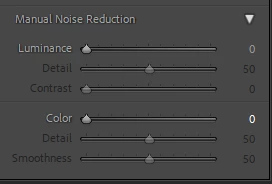
Trying to use manual noise reduction but the sliders are greyed out. Any idea why?

  • September 10, 2024
  • 2 replies
  • 320 views

I like the AI feature but it is simply too slow. I have 300 pictures and simply can't wait that long.

 

This topic has been closed for replies.

2 replies

JohanElzenga
Community Expert
Community Expert
September 10, 2024

As @AxelMatt said. The luminance and color sliders set the amount of luminance and color noise reduction. With the other sliders you can fine tune the effect, but you need to set an amount first, of course.


-- Johan W. Elzenga
AxelMatt
Community Expert
Community Expert
September 10, 2024

As far as I see the Luminace andthe Color slider are set to 0. In this case the correspondending sliders are greyed out. Set the appropriate sliders (Lunimance and/or Color) to a value > 0 and the other sliders should be enabled.


If this doesn't help, try to reset the preferences of Lightroom Classic:  How to reset Lightroom Classic preferences (adobe.com)

It's recommended to backup your preferences before you reset the preferences to the default settings: 

https://helpx.adobe.com/lightroom-classic/kb/preference-file-and-other-file-locations.html


If this also doesn't help, give us more and detailed informations about the issue and your environment.

Please provide a copy of your 'System Info'. This can be get from the LrC Help > System Info menu item. There's a copy button in the System Info dialog. Press this button and paste the info into your next forum post.


My System: Intel i7-8700K - 64GB RAM - NVidia Geforce RTX 3060 - Windows 11 Pro 25H2 -- LR-Classic 15 - Photoshop 27 - Nik Collection 8 - PureRAW 6 - Topaz Photo AI
jc2011Author
Participant
September 10, 2024

I think that's the reason... works now. thanks!