Inspiring
January 20, 2019
Answered

Turning off badges only in the filmstrip

  • January 20, 2019
  • 1 reply
  • 613 views

Never mind...  I think I've gotten them to turn off.  It appears that the Preference "Ignore clicks on badges" doesn't actually ignore the clicks.

    This topic has been closed for replies.
    Correct answer Ian Lyons

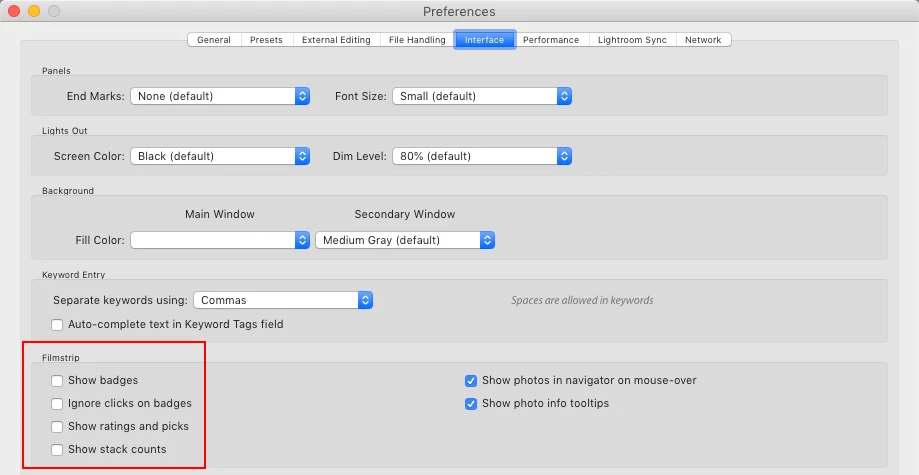
    Open Lightroom Preferences, then got to the Interface panel. In middle of the panel you'll see options for turning on/off visibility of badges, etc in Filmstrip

    Edit: below screenshot may help
    1 reply

    Ian Lyons
    Community Expert
    Ian LyonsCommunity ExpertCorrect answer
    Community Expert
    January 20, 2019

    Open Lightroom Preferences, then got to the Interface panel. In middle of the panel you'll see options for turning on/off visibility of badges, etc in Filmstrip

    Edit: below screenshot may help

    Inspiring
    January 20, 2019

    Thanks Ian...  Yes, I found the preferences and clicked the "ignore clicks on badges".  It doesn't appear to work.  Restart LR, click a badge, boom, you're out of the module you WERE in and in the module the badge is for...

    I finally figured out I have to unclick "Show badges".  That SEEMS to remove them from the filmstrip but leaves them on the grid thumbnails.

    Just Shoot Me
    Legend
    January 20, 2019

    The Grid view thumbnails badges are controlled from the "View Options" dialog, Grid View Tab, accessed by right clicking on an image in the grid.