Participating Frequently
April 23, 2017
Answered

Two of same local drive after HDR Merge

  • April 23, 2017
  • 1 reply
  • 508 views

From Lightroom, I merged some photos in Photoshop's HDR Pro. After hunting for quite a while, I discovered that the newly created file is imported into a new (in my case) 😧 drive. The photo file is in the same folder with the originals, but it doesn't show up in the "original" library folder.
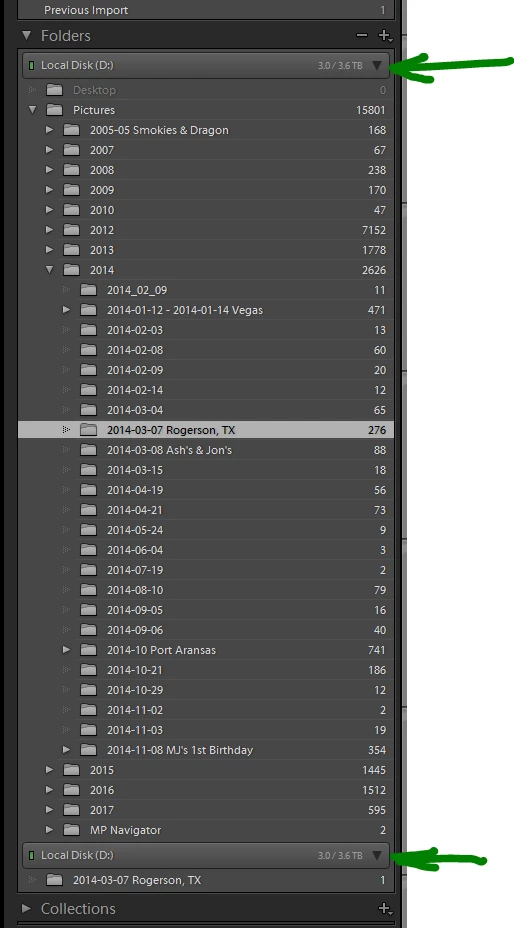
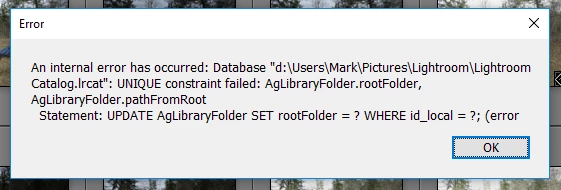
I found something online that suggested right-clicking the folder in the copy and choosing "Show parent folder" from the context menu. I did that and it showed "2014" as expected. I right-clicked the 2014 folder to show it's parent and got the following SQL error:
This is a brand new machine with Windows 10 Pro, and the current versions of Lightroom, and Photoshop.

To make the photo show up in the proper place, I removed the folders from the duplicate 😧 drive (which caused it to disappear), then synchronized the folder. Voila!

This topic has been closed for replies.
Correct answer Rob_Cullen

The "Duplicate"  Drive, or "Duplicate" folder,  is a problem that has been seen by other users.

The best answer I have seen is by Jim Wilde, and a forum thread can be found here-

Lightroom: Creates duplicate folder after Photoshop edit or Import from disk | Photoshop Family Customer Community

I suggest you read the answers by Jim very carefully, (particularly the third post in the answers),  because the steps to correct the problem are fairly specific, and trying other steps usually does not result in a permanent solution.

1 reply

Participating Frequently
May 1, 2017

Actually, this happens whenever I edit in Photoshop; HDR, Pano, Edit in...; you name it.

Any help out there?

Thanks!

Rob_Cullen
Community Expert
Rob_CullenCommunity ExpertCorrect answer
Community Expert
May 2, 2017

The "Duplicate"  Drive, or "Duplicate" folder,  is a problem that has been seen by other users.

The best answer I have seen is by Jim Wilde, and a forum thread can be found here-

Lightroom: Creates duplicate folder after Photoshop edit or Import from disk | Photoshop Family Customer Community

I suggest you read the answers by Jim very carefully, (particularly the third post in the answers),  because the steps to correct the problem are fairly specific, and trying other steps usually does not result in a permanent solution.

Regards. My System: Windows-11, Lightroom-Classic 15.3, Photoshop 27.5, ACR 18.3, Lightroom 9.3, Lr-iOS 10.4.0, Bridge 16.0.3 .
Participating Frequently
May 2, 2017

That did not fix my problem.