
Participant
June 19, 2024
Question

Unable to export pictures from a catalog

  • June 19, 2024
  • 1 reply
  • 148 views

Using LR5.7.1 on Windows 10.

See screenshot.

Why is the All Photographs total equal to the Missing Photographs total?

Why are there question marks next to the folders names?

Tried exporting with File->Export with Preset to DNG...did not work says "No rendered photo on disk".

Tried Export as Catalog (which took several hours) and the amount files at the destination is equal to the amount it should be, but no photos there, only thumbnails or very small files of type .lrprev.
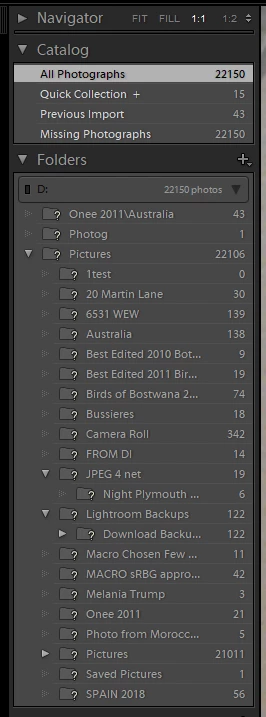
The photos look fine from the LR app and they look to be all there quantity-wise and quality-wise.

Starting the LR app gives 3 choices, 1 'regular' catalog and 2 backups.  The backup catalogs experience the same issue.

This topic has been closed for replies.

1 reply

dj_paige
Legend
June 19, 2024

Lightroom cannot find your 😧 drive, all the folders on the 😧 drive have question mark icons. SO that also explains why the count of all photos and the count of missing photos are equal. Make sure the drive is plugged into the USB port properly.


Sometimes, Windows changes the drive letter from D to something else. You can change the drive letter back to D  to fix the problem.


Otherwise, you can follow these instructions to fix the problem; see Figure 4 in particular.

Participating Frequently
July 1, 2024

Hi, rof38142930szzj. Welcome to Lightroom Community. I'll help you figure this out. 


The question mark means you moved your photos to a different location.

Where is your catalog stored? Is it an internal or external drive?


You can try these steps below: 

1. If your images are stored in an external drive, make sure to connect it properly to your device. 


2. You can log in to Lightroom Web at https://adobe.ly/3VQuyX1

from your email address, you have an active subscription to Lightroom and can check if you see images there. 


3. Please check this link for steps to locate missing images in Lightroom. https://adobe.ly/3xOqq1x


Also, please check the post from dj_paige and follow the steps that were shared. 


Let us know if this helps. 

Regards, 

Shivani