
David22675631caxn
Participant
January 20, 2022
Question

Unable to move files

  • January 20, 2022
  • 1 reply
  • 334 views

Hell friends... I have a strange situation going on. I just imported a couple of hundred photos (into folder and original sub folders) into LRC, as I have been for some time. Basically moving them from the original folder, to the same folder via LRC, which is allowing me to see and access them there.


With this recent batch, I received a message 'Could not move a file to the destination folder because it is not writable or there is not enought free space. (4)' - listing 30+ items that did not move. I went into the folders and specifically chose those same files again and oddly, it moved att but four this time. On third attempt the same four won't play along.

I am moving these files about on a 8TB HD with well over 6TB of free space and there are Read & Write restrictions on the folder.
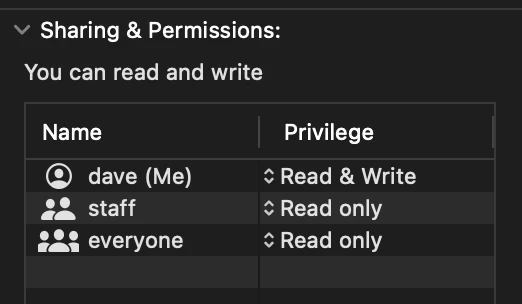
Any ideas?


Thanks in advance for your help!


- Dave

This topic has been closed for replies.

1 reply

David22675631caxn
Participant
January 20, 2022

Two tyo corrections to the original post...


1) "I went into the folders and specifically chose those same files again and oddly, it moved att but four this time."


was meant to say "..., it moved ALL but four this time."


2) I am moving these files about on a 8TB HD with well over 6TB of free space and there are Read & Write restrictions on the folder.


was meant to say "...,and there are NO Read & Write restrictions ."


I have also restrated the whole system and tried from the beginning, still the same results. Happening within other folder/subfolders as well. Still lots of space on the drive.

dj_paige
Legend
January 20, 2022

To do a move, you must have correct folder permissions on the folder where the photos are, and on the folder where the photos are supposed to move to.


Also, when you show us permissions, show us the WHOLE permission dialog box so we can see what folder you are talking about. Permissions on the entire drive are irrelevant, we need to see FOLDER permissions.

David22675631caxn
Participant
January 20, 2022

Sorry, that was the permissions for the actual folder I was transferring to. I have not checked the permissions for the source folder, but they are in fact the same folders. Just importing them so I can see them in LRC. I've shut eveything down for the night (except my ipad) will dig in again tomorrow 


Thanks for the reply 😊