


roverdublin
Inspiring
January 11, 2026
Question

Unable to Sync photos from Lightroom Classic to Lightroom Web

  • January 11, 2026
  • 2 replies
  • 74 views

I have a Syncing problem with my Lightroom Classic to Lightroom Web. This is not the first time I have this problem. 

The files are stuck in the syncing !
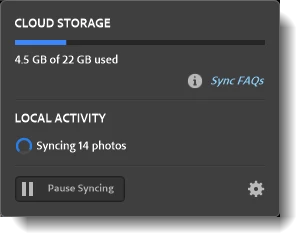
874037iB1258A198CA33710.png

There are no Sync Errors to report. 

In my desperation, I rebuilt the Sync Database, but no success.


I then generated the Sync Report, and the system tells me to contact Lightroom Support, but I cannot find any contact information on the Adobe site for Adobe Support. Where do I send the Diagnostic Report to??


I have been a customer for years, and I pay quite a bit of money for Adobe Apps, so I should be able to get a good Support Service.


And before I get tons of questions, yes, I run the latest versions of Adobe apps, and I have the latest Windows 11 installed on my I7 processor run PC.

Internet connection is working!

2 replies

Srishti_Bali
Legend
January 12, 2026

Hi @roverdublin


Thanks for reaching out and you have already reached one of the support channels. If you want, you can send the report to me via DM. Click on my name; it will open my profile where you get the option to send me a message. 


Also, please share what exactly is happening. You said it's not giving any errors, but what exactly is happening? Is it not showing synced photos or is the sync stuck? Where are the photos you are trying to sync saved? 


We're here to help!


Regards,

Srishti

roverdublin
Inspiring
January 11, 2026

I have a Syncing problem with my Lightroom Classic to Lightroom Web.

I rebuilt the Sync Database, but no success.

I then generated the Sync Report, and the system is telling me to contact Lightroom Support but I cannot find any place on the Adobe site where I can contact Adobe Support. Where do I send the Diagnostic Report to??