
February 9, 2020
Question

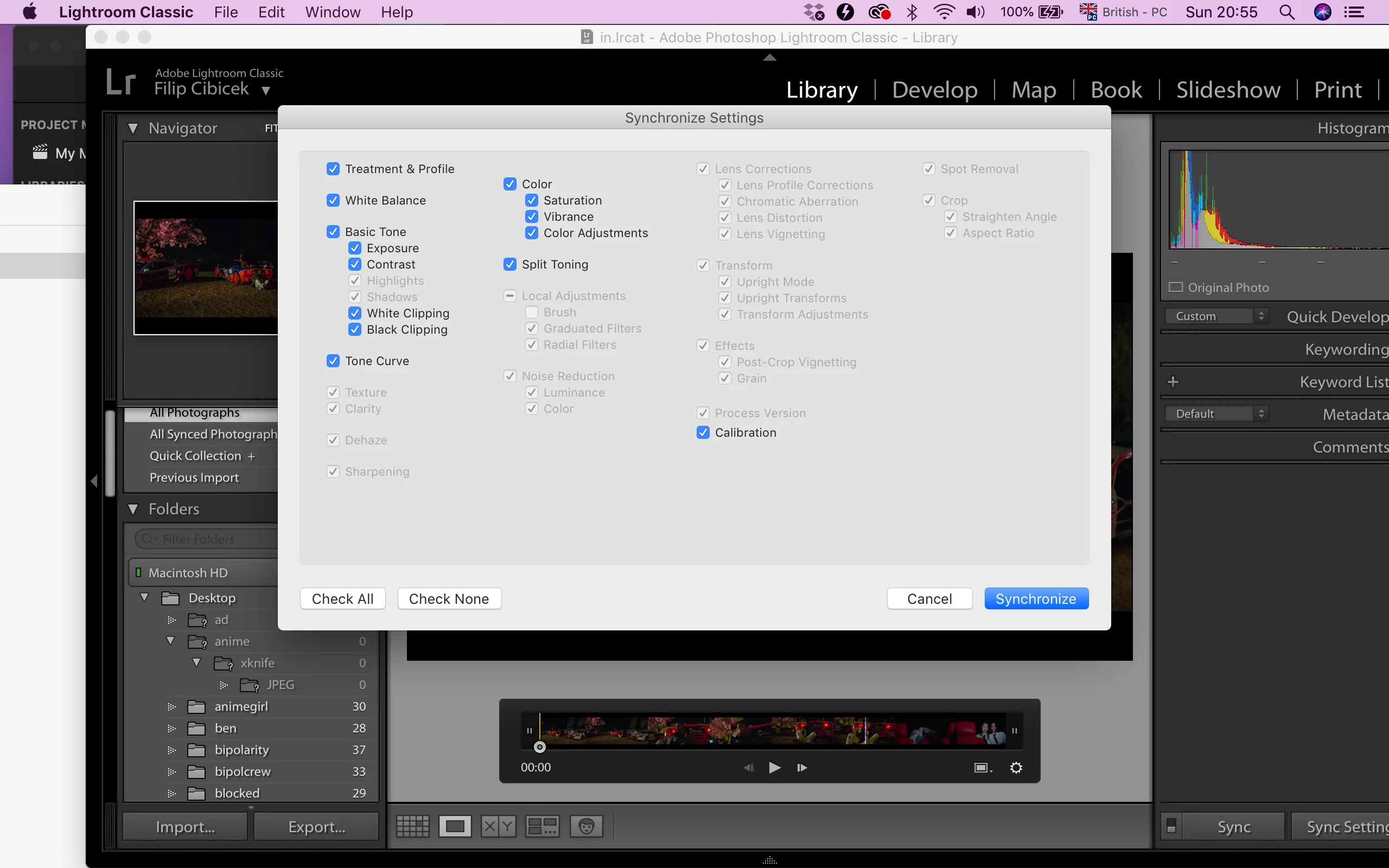
Unable to sync texture, clarity and highlights.
  • February 9, 2020
  • 5 replies
  • 1308 views

Hey there,

I’m trying to sync the settings between a snapshot and the original video to apply Lightroom edit onto a video. For some reason, I am only able to sync the exposure & contrast, see in screenshot. If this is not possible, is there any software that does what lightroom does but for video? Like texture, clarity, highlights etc.?

Thanks for any response.


{Moved from Lightroom Cloud to Lightroom Classic Forum by Moderator} 


This topic has been closed for replies.

5 replies

Todd Shaner
Legend
February 11, 2020

"However, Clarity and Texture are not available in Adobe video applications, probably for the reasons johnrellis talked about."

There are ways to emualte clarity effect in Premiere Pro as shown in one example at the below link. If interested post your request in the Premiere Pro forum for more suggestions.

https://www.4kshooters.net/2015/11/10/emulating-photoshops-clarity-effect-on-video-using-premiere-pro-cc/

Tony_See
Inspiring
February 11, 2020

I've found DaVinci Resolve an excellent video tool with many abilities within the free version.

Conrad_C
Community Expert
Community Expert
February 11, 2020

howtosync wrote: “If this is not possible, is there any software that does what lightroom does but for video? Like texture, clarity, highlights etc.?”


In Adobe Premiere Pro and After Effects, the Lumetri Color panel does provide Highlights and Shadows. In fact much of the Lumetri Color panel was designed to resemble the controls in Lightroom and Camera Raw. If you have a good GPU, the Lumetri Color panel should give you a much smoother and more productive video editing experience than Lightroom, because Lumetri Color is GPU-accelerated. Lightroom Develop controls are GPU-accelerated too, but for large single still frames, not across many video frames at once, and also, the options for exporting your edited video are much more limited in Lightroom than in a video editor such as Premiere Pro.


However, Clarity and Texture are not available in Adobe video applications, probably for the reasons johnrellis talked about. If you need to apply features like Clarity and Texture to a video, you may have to look at non-Adobe applications. I use a non-Adobe plug-in that integrates with Lightroom to export time-lapse videos, and it can sync Clarity, Texure, Highlights, and Shadows, but the author strongly recommends applying the smallest values you can get away with for those options, precisely because of how local frame-by-frame variations can produce a flickering effect. My guess is that Highlights and Shadows are less likely to cause those problems in Premiere Pro because they’re more optimized for video in that application.

johnrellis
Legend
February 11, 2020

To build on Todd's suggestion to look at Premiere Pro, Resolve (free for individual use), or Final Cut Pro for more sophisticated editing:


The effect of Highlights and Shadows on any one pixel depends on the tonal range of the entire image.  The effects on any one pixel of Texture, Clarity, Dehaze, Sharpening, and Noise Reduction depend on nearby pixels. So applying these settings (as they're implemented in LR) to a sequence of frames could produce flickering and other artifacts, since the settings' effects on a given pixel value could change frame-to-frame.


On the other hand, the effect of Tone Curve on any one pixel is the same regardless of other pixels in the image.  So a tone curve applied to a sequence of frames will produce the same effect on a pixel of a given value in all the frames.


[Use the reply button under the first post to ensure replies sort properly.]

Todd Shaner
Legend
February 10, 2020

You can edit video in PS using the Camera Raw Filter, but the render time is very slow. Adobe Premiere Pro or Premiere Elements are better for video editing.

https://f64academy.com/how-to-edit-videos-in-adobe-camera-raw/