
Participant
February 10, 2023
Question

Unable to View Identity Plate and Tool Bar

  • February 10, 2023
  • 1 reply
  • 187 views

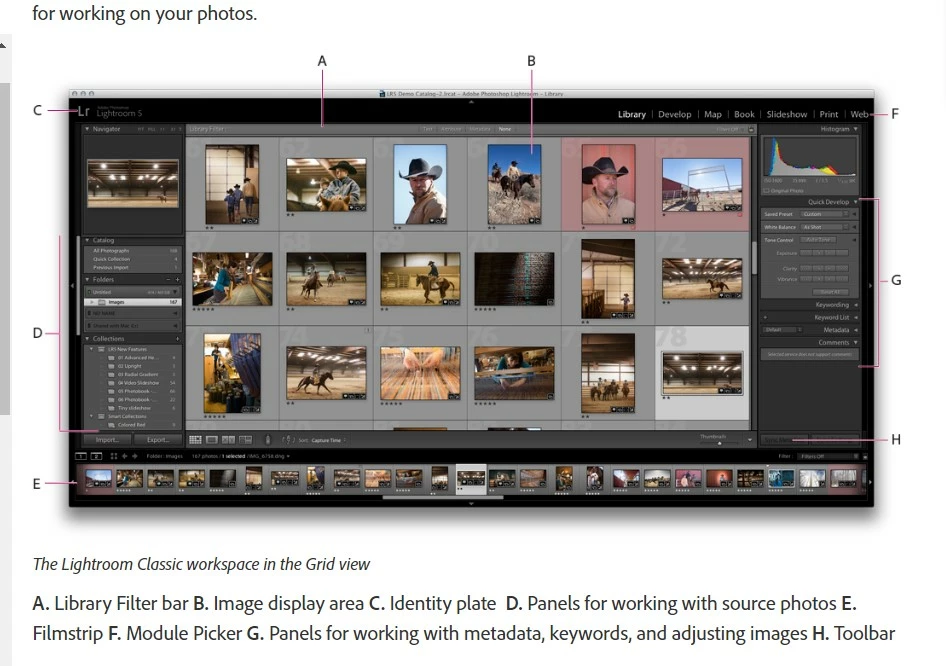
I am a new LC user (Windows) and I am not able to view the Identity Plate (Item C in photo below) at the top of the screen or the Tool Bar (Item H) at the bottom. I can see them on tutorial screens but not on my home screen.  What might I be missing?
This topic has been closed for replies.

1 reply

Rob_Cullen
Community Expert
Community Expert
February 10, 2023

Try a few of the keyboard shortcuts-

Function key 5 [F5]  for the Identlty plate line.

[T] for the Toolbar.

[Ctrl+/ ] for a list of shortcuts (for the current module that is viewed)

[Ctrl + Alt + F ]  For 'Normal' screen mode.

And then the main MENU: Window > Screen Mode...


Regards. My System: Windows-11, Lightroom-Classic 15.0, Photoshop 27.0, ACR 18.0, Lightroom 9.0, Lr-iOS 10.4.0, Bridge 16.0 .