Participant
November 12, 2023
Question

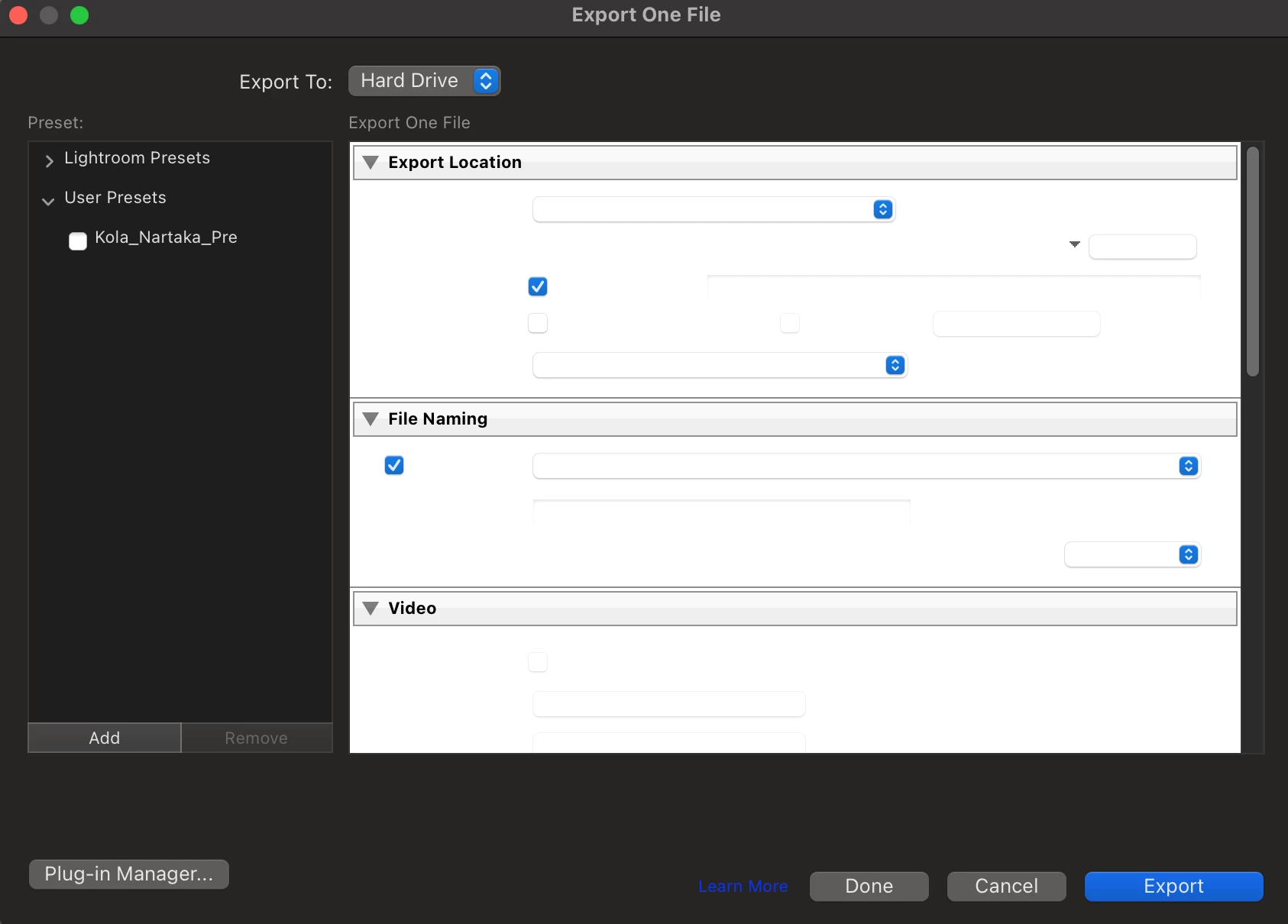
Unable to view the options in the export window
  • November 12, 2023
  • 3 replies
  • 324 views


All windows in Lightroom look this way. 

This topic has been closed for replies.

3 replies

Participant
December 23, 2023

This issue occurs only when using lightroom when my MacOS appearence is set to dark. Setting it to light solves this issue.


MacOS System Settings > Appearance > Light

Participant
November 14, 2023


I tried resetting the preferences. Even tried reverting to an older version, but the same error persists for all windows. Is making Lightroom unusable for me. 


Lightroom Classic version: 13.0.1 [ 202310121438-d2af310c ]
License: Creative Cloud
Language setting: en-IN
Operating system: Mac OS 13
Version: 13.0.1 [22A400]
Application architecture: arm64
Logical processor count: 8
Processor speed: NA
SqLite Version: 3.36.0
Built-in memory: 32,768.0 MB
Real memory available to Lightroom: 32,768.0 MB
Real memory used by Lightroom: 2,006.1 MB (6.1%)
Virtual memory used by Lightroom: 4,09,620.8 MB
Memory cache size: 4.9MB
Internal Camera Raw version: 16.0 [ 1677 ]
Maximum thread count used by Camera Raw: 5
Camera Raw SIMD optimization: SSE2
Camera Raw virtual memory: 403MB / 16383MB (2%)
Camera Raw real memory: 488MB / 32768MB (1%)
Standard Preview Size: 3600 pixels
Displays: 1) 3600x2338

Graphics Processor Info:
Metal: Apple M1 Pro
Init State: GPU for Export supported by default
User Preference: Auto

Application folder: /Applications/Adobe Lightroom Classic
Library Path: /Users/sri/Pictures/Lightroom_23/Lightroom_23.lrcat
Settings Folder: /Users/sri/Library/Application Support/Adobe/Lightroom

Installed Plugins:
1) AdobeStock
2) Aperture/iPhoto Importer Plug-in
3) Flickr
4) Nikon Tether Plugin

Config.lua flags: None


GoldingD
Legend
November 14, 2023

/Edit//remedied


Moderator

I think this is a duplicate posting. 

https://community.adobe.com/t5/lightroom-classic-discussions/unable-to-view-the-options-in-the-export-window/m-p/14229317#M344519 

Can you remedy.

Community Expert
November 12, 2023

In a first step try is to reset the preferences to the default settings.

  • Reset Procedure:
  • Close Lightroom.
  • Windows: Hold down [Alt]+[Shift] while restarting Lightroom.
    Mac: Hold down [Opt]+[Shift] while restarting Lightroom.
  • Overwrite the Preferences when prompted by the dialog.
  • Close Lightroom.
  • Restart Lightroom.


It's recommended to backup your preferences before you reset the preferences to the default settings: 

https://helpx.adobe.com/lightroom-classic/kb/preference-file-and-other-file-locations.html


If this doesn't help, please provide a copy of your 'System Info'. This can be get from the LrC Help > System Info menu item. There's a copy button in the System Info dialog. Press this button and paste the info into your next forum post.


My System: Intel i7-8700K - 64GB RAM - NVidia Geforce RTX 3060 - Windows 11 Pro 25H2 -- LR-Classic 15 - Photoshop 27 - Nik Collection 9 - PureRAW 6 - Topaz Photo AI
Participant
November 12, 2023

Lightroom Classic version: 13.0.1 [ 202310121438-d2af310c ]
License: Creative Cloud
Language setting: en-IN
Operating system: Mac OS 13
Version: 13.0.1 [22A400]
Application architecture: arm64
Logical processor count: 8
Processor speed: NA
SqLite Version: 3.36.0
Built-in memory: 32,768.0 MB
Real memory available to Lightroom: 32,768.0 MB
Real memory used by Lightroom: 2,006.1 MB (6.1%)
Virtual memory used by Lightroom: 4,09,620.8 MB
Memory cache size: 4.9MB
Internal Camera Raw version: 16.0 [ 1677 ]
Maximum thread count used by Camera Raw: 5
Camera Raw SIMD optimization: SSE2
Camera Raw virtual memory: 403MB / 16383MB (2%)
Camera Raw real memory: 488MB / 32768MB (1%)
Standard Preview Size: 3600 pixels
Displays: 1) 3600x2338

Graphics Processor Info:
Metal: Apple M1 Pro
Init State: GPU for Export supported by default
User Preference: Auto

Application folder: /Applications/Adobe Lightroom Classic
Library Path: /Users/sri/Pictures/Lightroom_23/Lightroom_23.lrcat
Settings Folder: /Users/sri/Library/Application Support/Adobe/Lightroom

Installed Plugins:
1) AdobeStock
2) Aperture/iPhoto Importer Plug-in
3) Flickr
4) Nikon Tether Plugin

Config.lua flags: None


The error still persists.