
Participant
November 9, 2021
Question

Understanding the new Luminance Range Mask tool interface

  • November 9, 2021
  • 4 replies
  • 2873 views

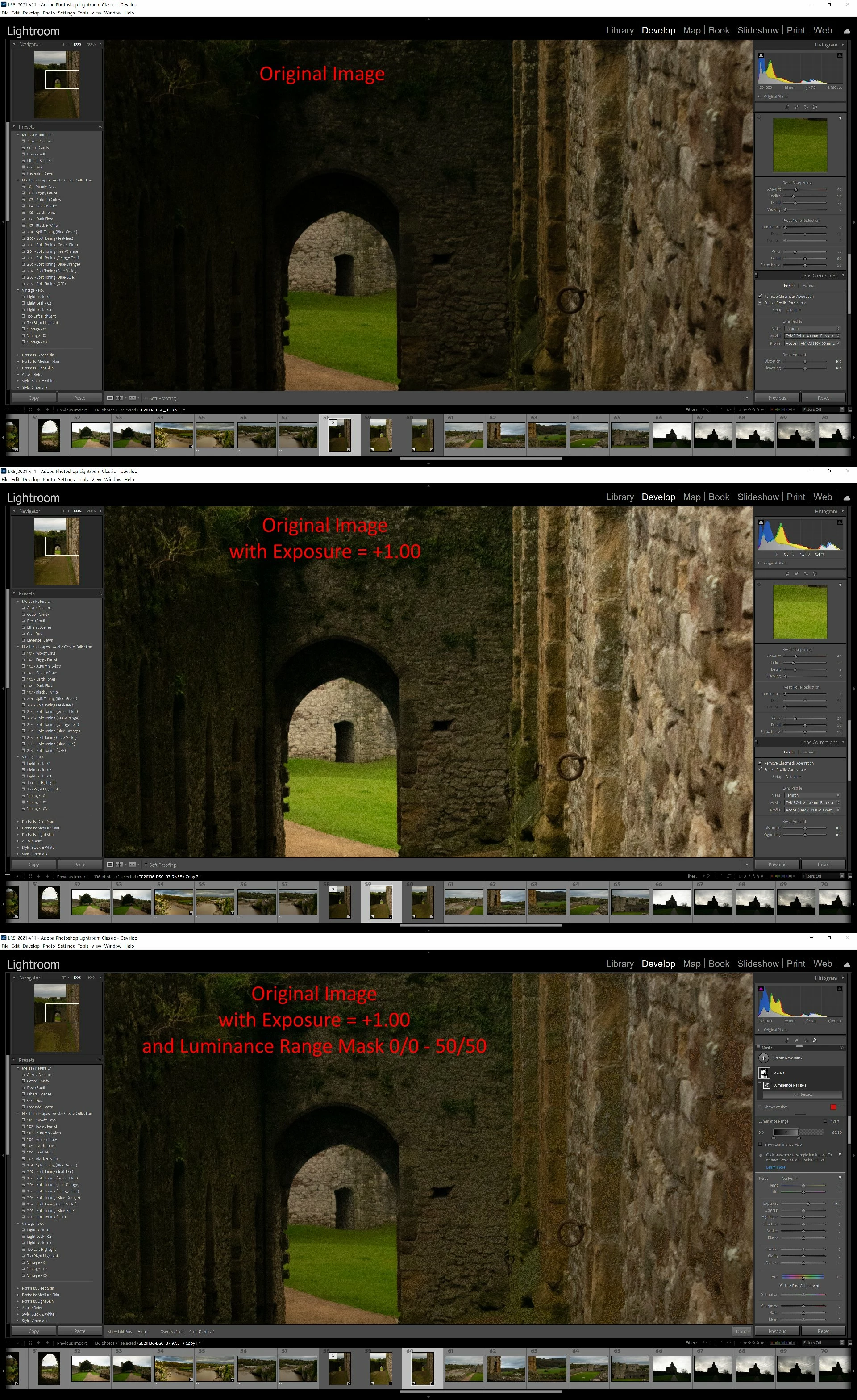
What is going on with Range Masks in the latest update to Lightroom Classic. I used to use Luminance Range Masks all the time to modify dark or light parts of the image, sometimes in conjunction with a gradient mask. It worked really well.


Now when I try to do the same thing with the new updated Mask tool, I get a horrible effect where the afffected parts of the image seem to get crushed and all the pixels compress towards the same value. It's awful.


Am I doing something wrong? Is anyone else experiencing this?

I'm running Lightroom Classic 11.0 with Camera Raw 14.0.


This topic has been closed for replies.

4 replies

ShootingMountaineer
Participating Frequently
May 24, 2022

Having the same issue, luminance masks are ugly and clipped/digital looking with the new updated.  The old workflows with them gave much better results.  This is easier to use, but the results are so bad I don't use luminance masks anymore.

dj_paige
Legend
May 24, 2022

Please read the earlier replies from @Bob Somrak 

ShootingMountaineer
Participating Frequently
May 24, 2022

I did, and, as he said, there is only one-way feathering now, which is inferior to the previous way of doing it.  So I just need to keep in mind the new luminance mask is much less capable than the old one.

GoldingD
Legend
November 10, 2021
Matt0sAuthor
Participant
November 10, 2021

Thanks for this, I will give it a watch and try to learn more.

Bob Somrak
Legend
November 9, 2021

BTW, i forgot to mention that the Feather Controls are the little triangles on the bottom of the Range Slider

M4 Pro Mac Mini. 48GB
Matt0sAuthor
Participant
November 10, 2021

Thanks for the reply (and the one above). I had another play using the feather controls (I had tried previously) and I can see they do allow more control but it still seems incredibly difficult to get a good result (compared to the previous version of LR) and very easy to get a horrible result. I will experiment further and watch the video suggested below.

Bob Somrak
Legend
November 10, 2021

One thing to remember is the Smoothness on the old range mask feathered in and out from both ends of the range and the new feather only feathers out from the range so you need to use smaller ranges in the new mask.  

M4 Pro Mac Mini. 48GB
Bob Somrak
Legend
November 9, 2021

You Range Mask is 0/0 50/50 which means you didnt use Feather Controls on the Range Slider so it is going to look blocky/ugly/horrible.  Watch a video on the new range mask to see how it works.

M4 Pro Mac Mini. 48GB
Participant
August 12, 2024

Please explain what is 0/0 50/50. what does it mean.


Bob Somrak
Legend
August 12, 2024

@Iqbal_Huma3733 

They are the values of the Luminance Range. (left and right side)


See this youtube video for more info

https://www.youtube.com/watch?v=8eP9NqeGH1o

M4 Pro Mac Mini. 48GB