
Participant
September 17, 2023
Question

Unexpected error when creating temporary working copy of the catalog.

  • September 17, 2023
  • 2 replies
  • 132 views

I click on File, Import from another catalog, double click the .lrcat, this error pops up:
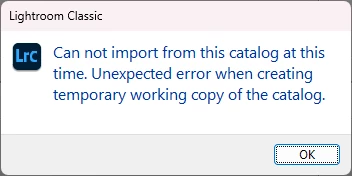
OS Name Microsoft Windows 11 Pro for Workstations
Version 10.0.22621 Build 22621

Available Physical Memory 26.5 GB

Lightroom Classic 12.4

Camera Raw 15.4

This topic has been closed for replies.

2 replies

dj_paige
Legend
September 19, 2023

Unexpected errors sometimes are indicative of a catalog that is corrupted, because of a hard disk malfunction somewhere.


Try creating the catalog that is to be imported on a different disk than the one you had it on.

Sameer K
Community Manager
Community Manager
September 19, 2023

Hey, @David32336199fq7b. Welcome to the Lightroom Classic community. I'll help you figure this out.


Where are both (Target & the one're you are merging to) the catalogs stored? Internal or External drive?

Try moving the both of the catalog folders from the external drive to the internal drive & if they're already on the internal drive, then move to a different location on the internal hard drive.


Let me know how it goes. Thanks!

Sameer K