Participant
February 18, 2017
Answered

Unknown drive has appeared in 'Import' screen?

  • February 18, 2017
  • 2 replies
  • 439 views

Hello,

I have noticed when importing photographs that a new 'drive' has appeared in the Source list in addition to the usual 'Macintosh HD'. If I click on 'Import', under 'Source' it lists 'Macintosh HD', which appears to work fine, but it also had a new drive named with a random string of letters and numerals (see screen grab below). This 'drive' does not show any folders when I maximise it, although it appears to have the same capacity as my 120GB 'Macintosh HD' drive. Is there a way to delete this redundant drive?
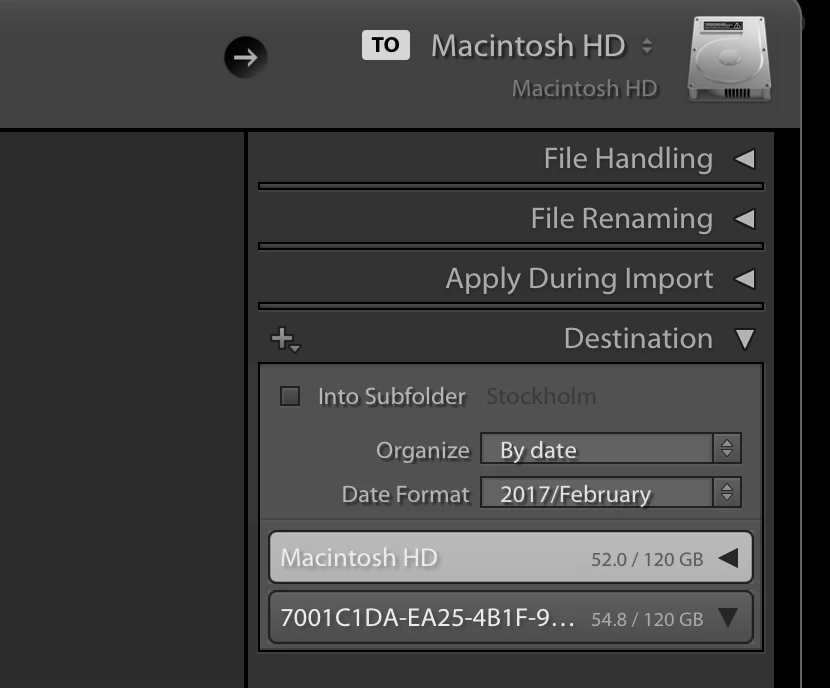
I think these problems started occurring after recently running the disk cleanup utility on my MacBook Pro (running macOS Sierra version 10.12.3), so I am not sure if this has altered my setup somehow. I've tried reinstalling Lightroom but to no avail.

Any advice would be appreciated!

Thanks!

Paul

This topic has been closed for replies.
Correct answer Bob Somrak

No it doesn't. It doesn't appear anywhere else but in the Lightroom 'Import' screen.


I run the "First Aid" on my Mac every so often and just did it and I don't have phantom drive.  This is OS X 10.11.6 so maybe it is a Sierra problem.

2 replies

Just Shoot Me
Legend
February 18, 2017

What Disk Cleanup utility did you run?

Participant
February 18, 2017

It was just the built-in 'Disk Utility' on the Mac. I selected 'First Aid' to check for errors. It may just be coincidence but I can't remember this drive being there before that.

Bob Somrak
Legend
February 18, 2017

Try a complete shutdown/restart of the computer.

M4 Pro Mac Mini. 48GB
Participant
February 18, 2017

Hi Bob,

I have just tried that, though unfortunately the drive is still showing. Strangely though, it now has a completely different series of letters/numbers as it's name...

Paul

Bob Somrak
Legend
February 18, 2017

Does this "phantom" drive show up in FINDER?

M4 Pro Mac Mini. 48GB