
Unuusal issues with importing and the file structure.
Hi all,
I have an unusual problem with Lightroom that I can't seem to fix, and it appears to be due to the way Windows stores files.
I have a folder with an archive of old weddings, but on first import, Lightroom only imported 6000 of the 23000 images. When I right-click>synchronize on the archive folder, Lightroom tells me there are 17,000 new images.
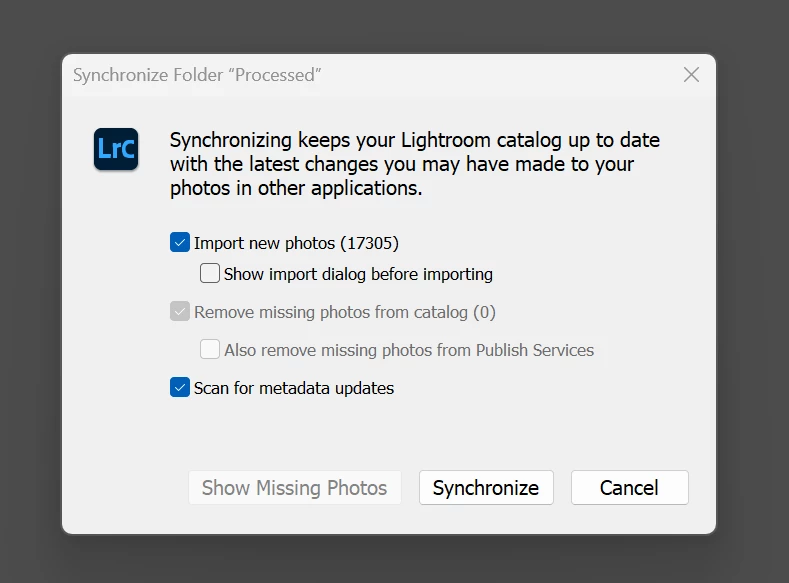
However, when I hit Synchronize again, it says there are no images to import.

Where things get stranger is when I drag the images in to import from the individual subfolder, it creates the strangest file structure:
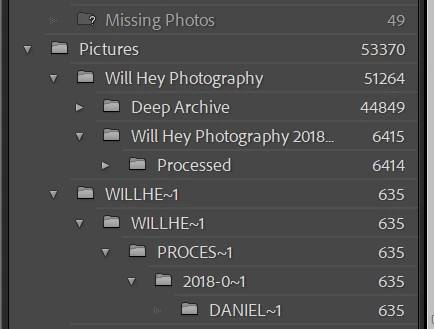
As you can see above, there is the original "processed" archive where some images are, and the strange new one Lightroom has added with the ~ signs.
Has anyone experienced this before and could suggest a fix?
Many thanks.


 AdChoices