
Brian GH
Participating Frequently
June 16, 2021
Question

Update "Process Version" not available when Syncing

  • June 16, 2021
  • 1 reply
  • 970 views

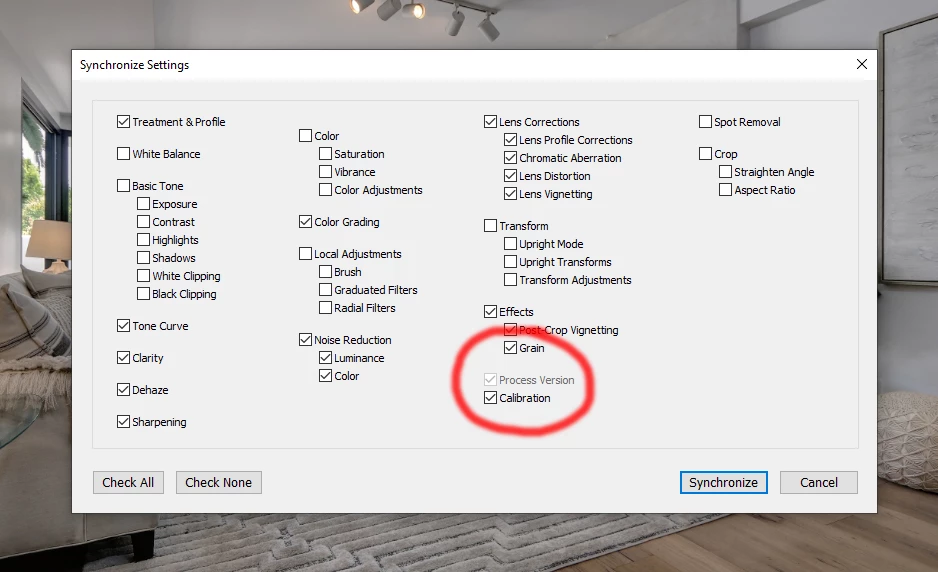
In the newest version, in the Sync settings, you can not change the process version and have it sync with the other settings. The option is unavailable.  See the attached screen grab. 
This topic has been closed for replies.

1 reply

Rob_Cullen
Community Expert
Community Expert
June 16, 2021

"The Process Version option will be auto-selected if a related setting is selected."
https://helpx.adobe.com/lightroom-classic/help/whats-new/2021-3.html#other-enhancements


These words in the Update notes suggest to me that if there is nothing in the Settings influenced by the Process Version, then there is no reason the check the Process Version box. (It is irrelevent for the Preset, or Sync action, being created). Ot maybe some Settings depend on the current Process Version and will not work if the PV is changed.


Laura Shoe puts a different spin on the wording-

https://laurashoe.com/2021/06/08/super-resolution-native-m1-support-and-more-come-to-lightroom-classic-10-3/

"Process Version will be automatically selected when Basic tone controls and/or Treatment & Profile are checked (and it can not be deselected). This change also is present in the Sync and Copy/Paste dialogs."

Regards. My System: Windows-11, Lightroom-Classic 15.3, Photoshop 27.5, ACR 18.3, Lightroom 9.3, Lr-iOS 10.4.0, Bridge 16.0.3 .
Brian GH
Brian GHAuthor
Participating Frequently
June 16, 2021

Ok, but I tried to change the process version to a different version.  I like to use version 2 for the Fill Light for some of the real estate work I shoot, and while it IS "Auto-Selected", the process version didn't sync. The first image (where I set my defaults) changed, and then the rest went back to Process Version 5. Does THAT make any sense?

Rob_Cullen
Community Expert
Community Expert
June 16, 2021

Does THAT make any sense? No, and I see the same- Using Copy and Paste: the Process Version 2 does not 'Copy' to multiple selected images in the filmstrip. But by using the [Sync...] button it does!

I doubt Adobe would see this as a 'Bug'. There would be few LrC users that want to go back to old Process Versions.


What does make sense to me would be to use PV 5 exclusively, and know that the Shadows slider does the same as the Fill slider in PV2. Use PV5 only, and you have no worries about the PV with C&P or Sync of Develop adjustments 🙂


Regards. My System: Windows-11, Lightroom-Classic 15.3, Photoshop 27.5, ACR 18.3, Lightroom 9.3, Lr-iOS 10.4.0, Bridge 16.0.3 .
