Known Participant
December 11, 2017
Answered

Updating catalog metadata after deleting sidecar files

  • December 11, 2017
  • 3 replies
  • 992 views

Metadata field "Sidecar Files" is not updating automatically if the sidecar files are deleted manually. Is there any way to correct this?

    This topic has been closed for replies.
    Correct answer Bob Somrak

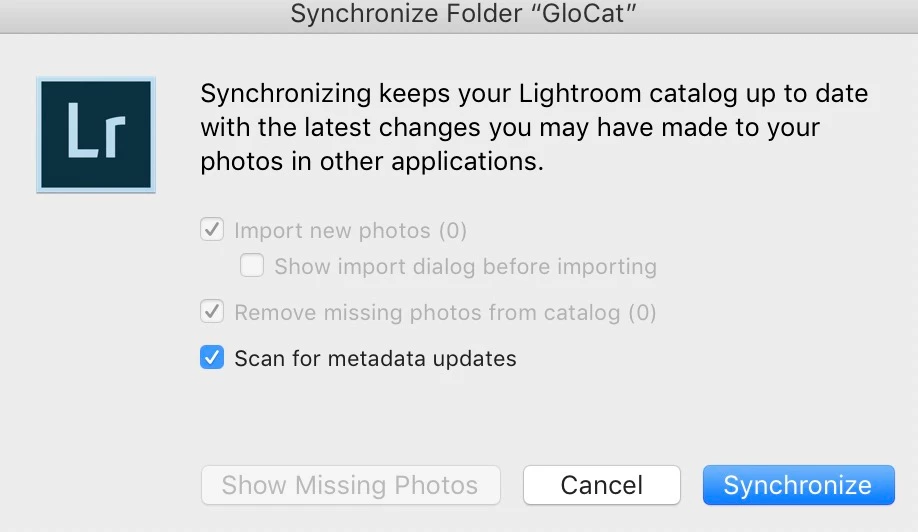
    If you are wanting to get rid of the broken links to sidecar XMP files just Right Click a Folder in Library and chose "Synchronize Folder"

    and uncheck everything except "Scan for metadata updates" and if the XMP file is missing it will remove the link in Library Metadata.  Then you can just rewrite the XMP.
    3 replies

    johnrellis
    Legend
    December 11, 2017

    Metadata field "Sidecar Files" is not updating automatically if the sidecar files are deleted manually. Is there any way to correct this?

    Do you want to correct that incorrect display so that you can rely on that field to help you identify future files that accidentally acquire sidecars?  Or is there some other reason?

    Known Participant
    December 12, 2017

    No, I even don't use original raws for editing anymore, I refresh my Lr skills currently and now I am goin over the metadata panel field by field.

    Of course, seeing the correct behaviour in this field would be good.

    Bob Somrak
    Bob SomrakCorrect answer
    Legend
    December 12, 2017

    If you are wanting to get rid of the broken links to sidecar XMP files just Right Click a Folder in Library and chose "Synchronize Folder"

    and uncheck everything except "Scan for metadata updates" and if the XMP file is missing it will remove the link in Library Metadata.  Then you can just rewrite the XMP.

    M4 Pro Mac Mini. 48GB
    Inspiring
    December 11, 2017

    I don't think there is a way without going into the guts of the catalog with an editor and changing the entries. I did that many years ago, and have made sure that I have never created any sidecars since then.

    I'd be happy to find out that there is a way to delete them from within LR. Is there? It would be a useful addition to LR.

    Bob Frost

    Known Participant
    December 11, 2017

    Ok, it was gone after playing with the file name.

    Inspiring
    December 11, 2017

    "Ok, it was gone after playing with the file name."

    ...........................

    What exactly did you do? Just curious.

    Bob F.

    Known Participant
    December 11, 2017

    Hi Bob,

    After converting photos to their original states (Ctrl + Shift + R) and deleting the sidecar files manually from the folder, just select all the photos and change their names (F2), then "sidecar files" fields are disappeared. If you like, you can again select all the photos and batch rename them to their original names later.