


Known Participant
Oct 27, 2026 10:24 PM UTC
Question

Updating "Edit in" list

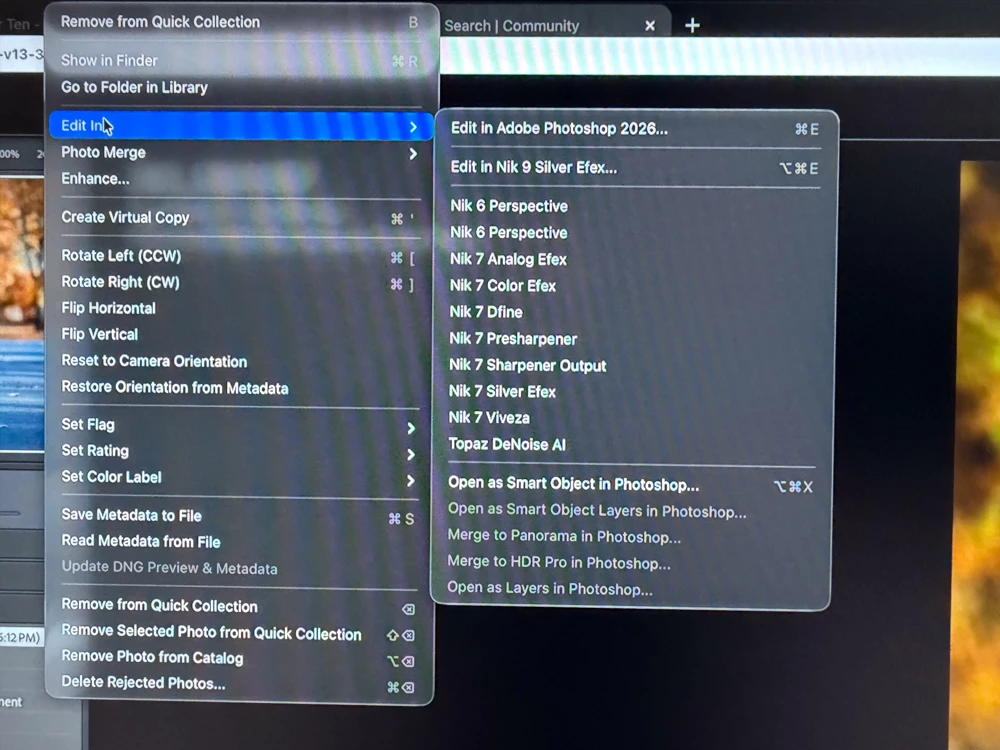
I recently updated to Nike Collection 9, and I’ve chosen one of the appropriate apps in the preferences pane, but I can’t figure out how to update the rest of the list in the pulldown menu to the rest of the app versions. This screenshot sort of explains everything - I need to remove all Nik 7 versions and replace them with the Nik 9 versions in the pulldown list. What am I missing?
 

    9 replies

    Legend
    Oct 28, 2026 3:16 PM UTC

    ​@MGregoryKnives 

    What shows when you click the Preset list?

    Your Screenshot is currently showing Custom. This might indicate that you haven’t saved this as a preset. Have you saved the preset for Nik 9 Color Efex?


    Translate
    Known Participant
    Oct 28, 2026 3:24 PM UTC

    Hi, ​@drtonyb 


    I’m sure that I’m just daft, but I don’t see where I’d actually be able to do that. I’m sure it’s obvious, and I’m totally overlooking it. Here’s what I see when I click the Preset list:


    What am I missing?

    Translate
    Legend
    Oct 28, 2026 3:30 PM UTC

    The External Editing Tab

    Translate
    Conrad_C
    Community Expert
    Community Expert
    Oct 27, 2026 10:43 PM UTC

    They’re in External Editing preferences.

    To delete one:

    1. Choose Lightroom Classic > Preferences, and click External Editing tab.
    2. Under Additional External Editor, click the Preset menu and select the editing application you want to remove from the list (like a Nik 7 preset).
    3. Click the Preset menu again, but this time, look at the bottom of that menu and choose Delete Preset (name of application)… . 

    To add one:

    1. In External Editing preferences, click the Choose button.
    2. Select the application (like Nik 9).
    3. Check the other settings in the Additional External Editor section.
    4. Click the Preset menu and at the bottom, choose Save Current Settings as New Preset.
    Translate
    Known Participant
    Oct 27, 2026 10:48 PM UTC

    Wow, that was an insanely fast reply. Thank you! I’ll give it a shot.


    Thanks again!

    Translate
    Conrad_C
    Community Expert
    Community Expert
    Oct 27, 2026 10:52 PM UTC

    It was only fast because I happened to see your post not long after you posted it! Sometimes it takes a lot longer depending on who’s looking and if they know the answer...

    Translate