



FrankMazz
Inspiring
December 18, 2025
Answered

Upgrade to Lightroom Classic 15.0.1. problems

  • December 18, 2025
  • 2 replies
  • 288 views

I've just started my move to v15. I received a warning about the need to covert the v14 catalog - the main catalog set to open by default. (It's a poorly worded warning, IMO, but that's a different issue.) However, now that I am trying to open and convert another, smaller v14 catalog, LrC is gives no warning. In fact LrC is not visible in any way except it shows, in Win 11 Task Manager, some minimal CPU activity, minimal disk activity, and about 1,400 MB of memory use. I'm miffed that this mess would come from Adobe. Perplexity tells me to let it go overnight and that's what I'll do as I did with the much larger catalog last night. Yes, I have tons of free HD space, a new processor and 32 GB of RAM.

Correct answer AxelMatt
quote

I've just started my move to v15. I received a warning about the need to covert the v14 catalog - the main catalog set to open by default. (It's a poorly worded warning, IMO, but that's a different issue.) 


By @FrankMazz


What's the exact warning/error message?

On the update from Lightroon 14.x to 15.x it's necessary to update your catalog. That takes normaly only some minutes depend on the catalog size. 

In my case my catalog has a size of approx. 720 MB (included 75k images) and the conversion take at least 5 or 6 minutes. I don't remember the excat time.


It can be you main catalog has a fault. Do you have tried to use the catalog from the recent backup?

What you alsocan try is to check the integrity of the catalog.

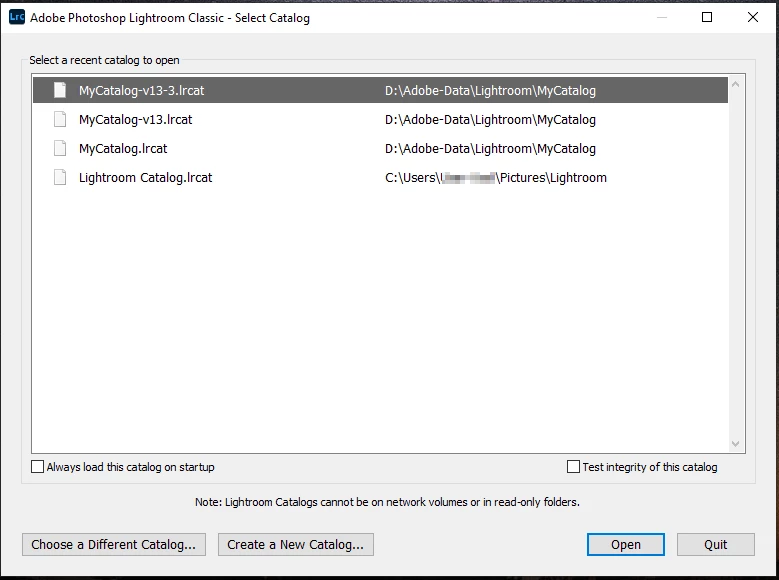
Hold the Ctrl-Key while starting LrC. This opens a catalog selection dialog.  


AxelMatt_0-1766057344164.png

Select the appropriate recent catalog and let it check it – note the checkmark "Test integrity of this catalog" to check its integrity.


2 replies

AxelMattCommunity ExpertCorrect answer
Community Expert
December 18, 2025
quote

I've just started my move to v15. I received a warning about the need to covert the v14 catalog - the main catalog set to open by default. (It's a poorly worded warning, IMO, but that's a different issue.) 


By @FrankMazz


What's the exact warning/error message?

On the update from Lightroon 14.x to 15.x it's necessary to update your catalog. That takes normaly only some minutes depend on the catalog size. 

In my case my catalog has a size of approx. 720 MB (included 75k images) and the conversion take at least 5 or 6 minutes. I don't remember the excat time.


It can be you main catalog has a fault. Do you have tried to use the catalog from the recent backup?

What you alsocan try is to check the integrity of the catalog.

Hold the Ctrl-Key while starting LrC. This opens a catalog selection dialog.  


AxelMatt_0-1766057344164.png

Select the appropriate recent catalog and let it check it – note the checkmark "Test integrity of this catalog" to check its integrity.


My System: Intel i7-8700K - 64GB RAM - NVidia Geforce RTX 3060 - Windows 11 Pro 25H2 -- LR-Classic 15 - Photoshop 27 - Nik Collection 9 - PureRAW 6 - Topaz Photo AI
FrankMazz
FrankMazzAuthor
Inspiring
December 18, 2025

Thanks for your input, but I have a couple of issues confused and will try to close or end this thread.

Thanks for your help. I'll help when I can do so without guessing.
dj_paige
Legend
December 18, 2025

@FrankMazz 

this topic does not belonw in this thread. Please start a new thread and people will be happy to try to help. Do not continue to discuss your problem in this thread.


[branched off to new thread by moderator. Title changed to avoid confusion]