
johns13406388
Participant
July 25, 2024
Question

Upgraded catalogue can't access External HD and images

  • July 25, 2024
  • 1 reply
  • 198 views

But other upgraded catalogues can. Plus I can create a new catalogue and access the images perfectly happily. All the files are on the same hard drive in the same location they have been forever. 

If I try and see the original file I get this:
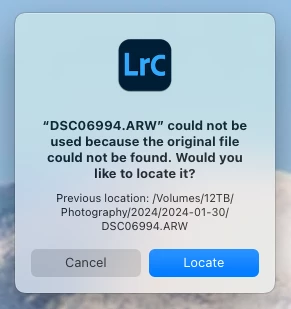
Then when I try to loacate the files I get this.
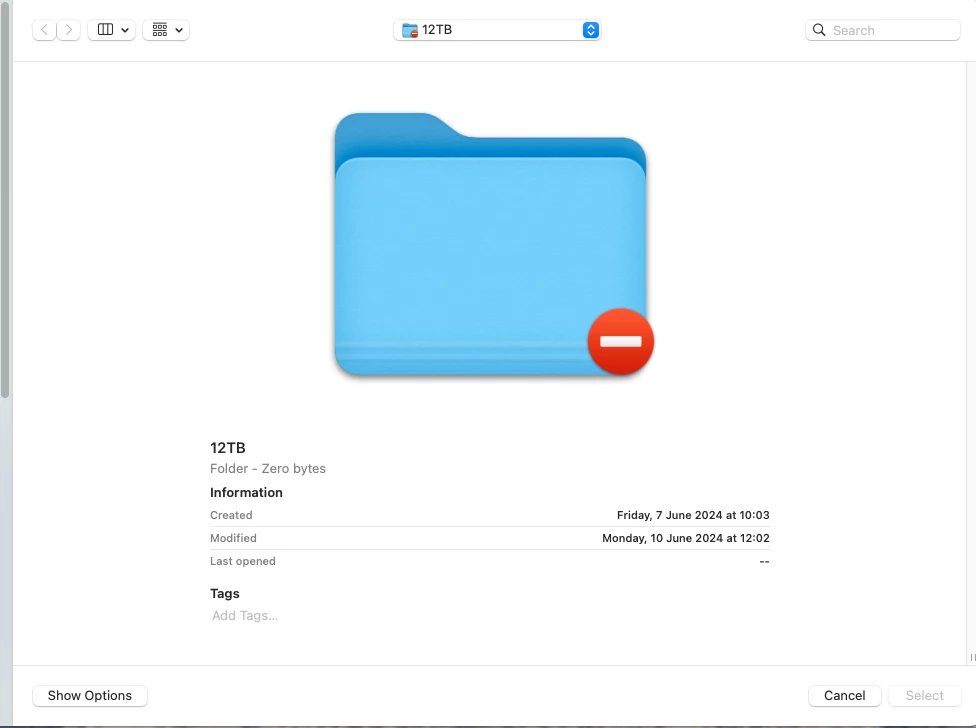
This is my main catalogue with 71,000 images in - It was working fine with previous versions of Lightroom Classic until I updated the app.


Anybody have any suggestions?


Thanks

This topic has been closed for replies.

1 reply

JohanElzenga
Community Expert
Community Expert
July 25, 2024

That is the icon for a folder that is off limits to the app due to permissions. Check the following. Select the disk in the Finder (not in Lightroom) and choose 'Info' (or type Cmd-I). Look at the bottom of the dialog, where the permissions are. You should have a checkbox 'Ignore ownership for this volume' and that box should be checked. If it is not checked, then click the lock, enter your MacOS password and check it.


-- Johan W. Elzenga
johns13406388
Participant
July 26, 2024

Thanks yes checked that and its as it should be - any new catalogue is fine and older catalogues are also fine when they are upgraded to the current version. I suspect the catalogue has become corrupted at some point, are the any integrity or repair tools?

JohanElzenga
Community Expert
Community Expert
July 26, 2024

I don't think there are utilities for that, but you don't need them. Upgrading a catalog creates an upgraded copy of that catalog, so the old catalog should still be in the catalog folder too. Upgrade that old catalog again.


-- Johan W. Elzenga