greggplu
Known Participant
October 17, 2024
Answered

Upgraded to Lightroom Classic v14 and followed prompts to convert my catalog from v13 to v14.

  • October 17, 2024
  • 2 replies
  • 585 views

After completing the upgrade, including following the prompts for converting my catalog, it still shows I am using a v13 catalog. 


Did it convert the catalog and keep the same name?


Or is it still using a v13 catalog?

This topic has been closed for replies.
Correct answer Conrad_C

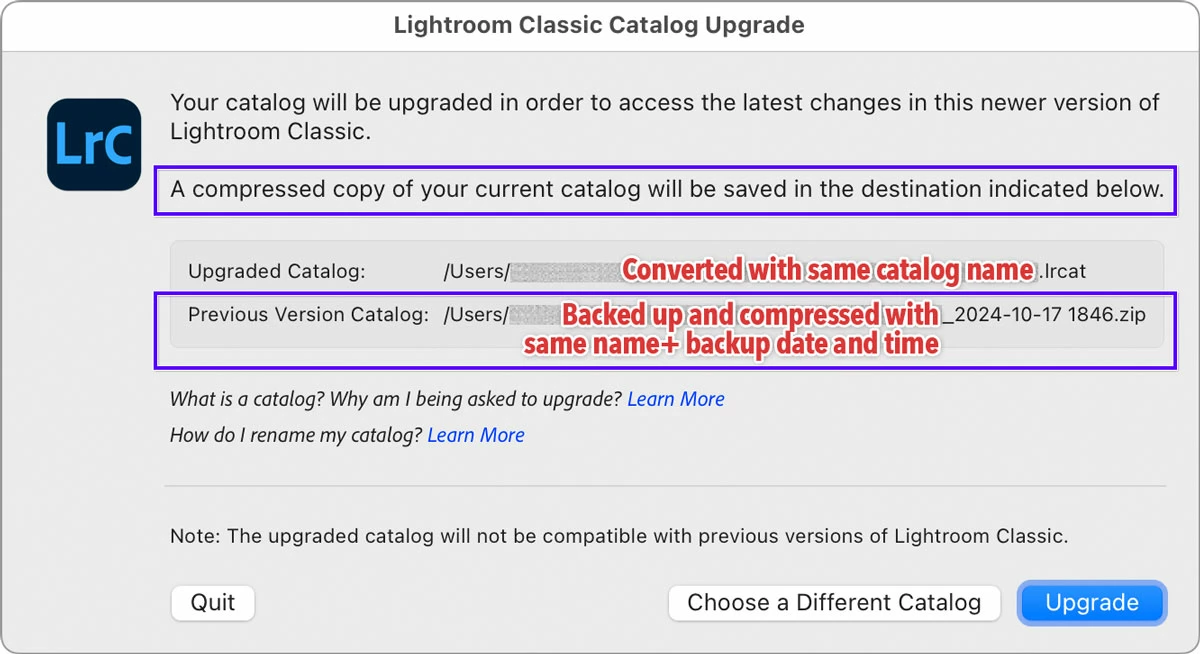
It did exactly what it says in the Catalog Upgrade dialog box:

  • The converted catalog retains the same name and folder location. 
  • The previous version catalog was backed up, compressed with the date and time added to the filename, and moved to a new subfolder called Old Lightroom Catalogs. Although that last part is hard to see if the Old Lightroom Catalogs folder name is truncated to fit the folder path in the available space. 


quote

After completing the upgrade, including following the prompts for converting my catalog, it still shows I am using a v13 catalog.

By @greggplu


Does that mean it still says 13 at the end of the catalog name? Because they did change that, they no longer add the version to the name. This is a good thing, because lots of long-time users had catalog names that ended like “…v10-v11-v12-v13” This finally puts a stop to that.


I also had the version number at the end of my catalog name, and because of the way Adobe changed the upgrade process, I knew the catalog name would not be altered again. So I used the handy new File > Rename Catalog* command to take the version number out of the catalog name, and that might be the last time I’ll ever have to manage that catalog name.


*For those of you who might say “Can’t you just rename the catalog file on the desktop like you do with other files?” The answer is sure, but you also have to remember to rename all of the associated files like its previews file, Smart Previews file, helper, etc., if present. The Rename Catalog command handles all those files for you.


2 replies

Conrad_C
Community Expert
Conrad_CCommunity ExpertCorrect answer
Community Expert
October 18, 2024

It did exactly what it says in the Catalog Upgrade dialog box:

  • The converted catalog retains the same name and folder location. 
  • The previous version catalog was backed up, compressed with the date and time added to the filename, and moved to a new subfolder called Old Lightroom Catalogs. Although that last part is hard to see if the Old Lightroom Catalogs folder name is truncated to fit the folder path in the available space. 


quote

After completing the upgrade, including following the prompts for converting my catalog, it still shows I am using a v13 catalog.

By @greggplu


Does that mean it still says 13 at the end of the catalog name? Because they did change that, they no longer add the version to the name. This is a good thing, because lots of long-time users had catalog names that ended like “…v10-v11-v12-v13” This finally puts a stop to that.


I also had the version number at the end of my catalog name, and because of the way Adobe changed the upgrade process, I knew the catalog name would not be altered again. So I used the handy new File > Rename Catalog* command to take the version number out of the catalog name, and that might be the last time I’ll ever have to manage that catalog name.


*For those of you who might say “Can’t you just rename the catalog file on the desktop like you do with other files?” The answer is sure, but you also have to remember to rename all of the associated files like its previews file, Smart Previews file, helper, etc., if present. The Rename Catalog command handles all those files for you.

David Ayars
Participating Frequently
October 19, 2024

Thank you, Conrad_C. I came here with the same question as OP. I even tried uninstalling and reinstalling LrC, because I thought my catalog must have failed to convert since it still had the old version number. Obviously it had already successfully converted, because one can't open a version 13 catalog in version 14 Lightroom Classic.


I took your suggestion and Renamed Catalog to remove the version number so as not to be confused by this in the future.

JohanElzenga
Community Expert
Community Expert
October 19, 2024

The big mistake Adobe made was that they know that people do not carefully read dialogs (especially not if that dialog looks familiar), and yet they fully rely on this dialog (and a "what's new?" web page that nobody visits) to explain the new behavior. It was predictable that this would be yet another confusing change. Lightroom Classic 14 should have used an intermediate method, whereby the upgraded catalog name would be stripped of all 'v11-v12-v13-v13-3' nonsense, with a separate dialog explaining it. Then from Lightroom Classic 15 onwards the current procedure could be used. Unfortunately, Adobe is famous for not learning from these kinds of mistakes.


-- Johan W. Elzenga
DdeGannes
Community Expert
Community Expert
October 18, 2024

Quote,

Did it convert the catalog and keep the same name? Yes


Or is it still using a v13 catalog? No

Check the read notes of the upgrade.

Regards, Denis: iMac 27” mid-2015, macOS 11.7.10 Big Sur; 2TB SSD, 24 GB Ram, GPU 2 GB; LrC 12.5,; Lr 6.5, PS 24.7,; ACR 15.5,; (also Laptop Win 11, ver 24H2, LrC 15.3; PS 27.0; ) Camera Oly OM-D E-M1.