


Participant
April 24, 2025
Answered

Upgrading from Dell 3779 laptop to use Lightroom classic

  • April 24, 2025
  • 2 replies
  • 250 views

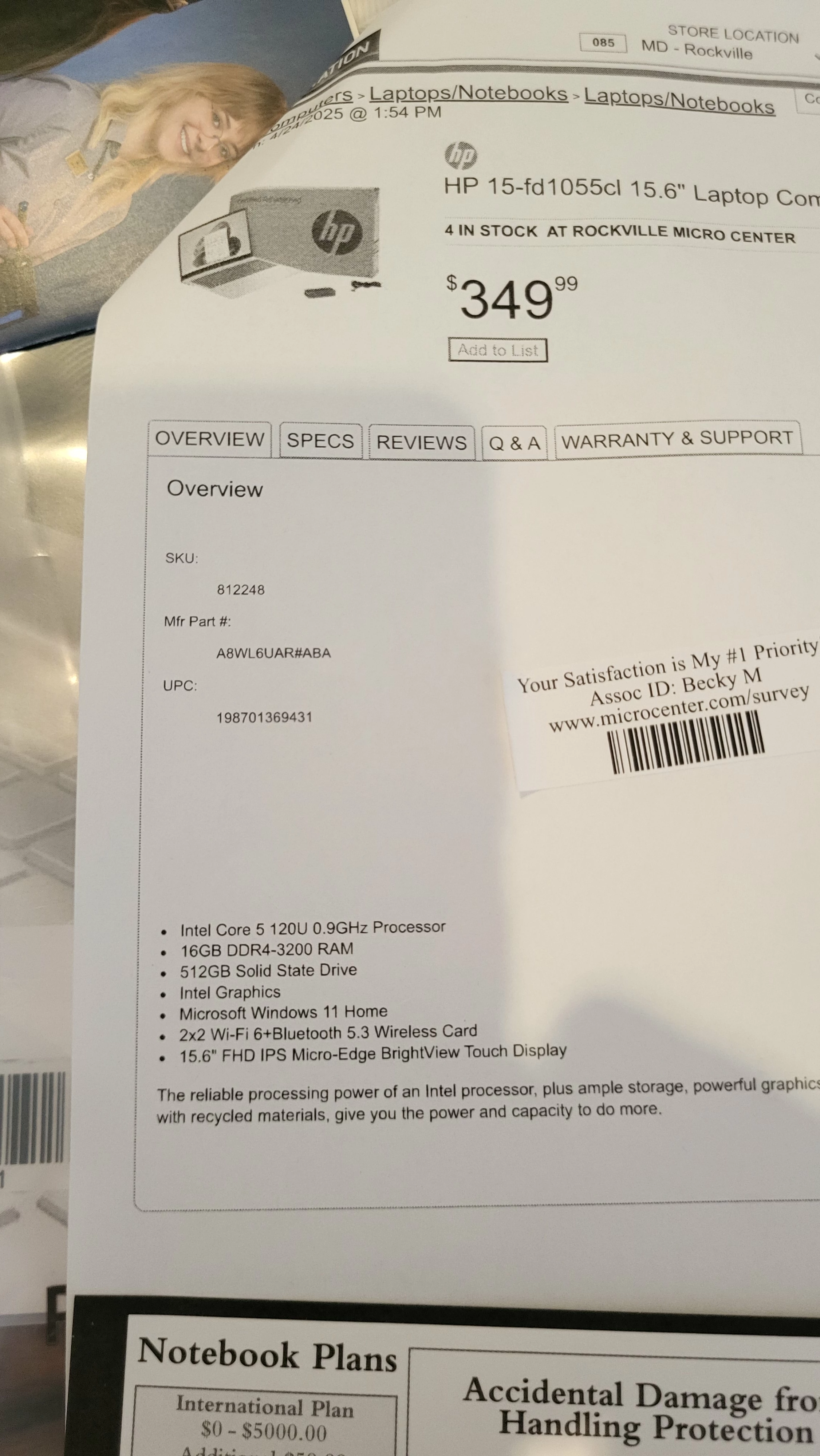
Hi everyone I was on Photo assignment last weekend shooting concerts Sunday and Monday Monday I opened my Dell 3779 laptop to find out Adobe would not let Lightroom 6 work on my laptop anymore. After about 3 days and 7 1/2 hours on share screen we've kind of thrown in the towel and I went out and purchased a computer that I could afford I really could not afford anything other than this and I'm starting it up now and if anyone can chime in on whether you think this is going to run Lightroom classic? I'm in a real pickle here I'm two days three days behind posting my photos so looking for some advice. Thanks much

Correct answer dj_paige

I'm starting it up now and if anyone can chime in on whether you think this is going to run Lightroom classic?


My Google cannot find a HP 15-fd 1055cl. The Intel 5 120U has a relatively slow benchmark by today's standards, but maybe its good enough. Or maybe not. The Intel Graphics probably will not run the AI tools in Lightroom Classic, or if it does run those tools, it will be extremely slow. Maybe next time you should ask us before you buy.


With regards to your Lr 6 issue, that is solvable, we here in this forum know how to install it. The instructions are here: https://community.adobe.com/t5/download-install-discussions/lightroom-6-on-a-new-pc/m-p/14638713#M580921


Maybe you should take the new laptop back and install Lr 6 on the old one. Your Lightroom Classic is returnable with no penalty in the first 14 days after you purchase it.


2 replies

dj_paige
dj_paigeCorrect answer
Legend
April 24, 2025

I'm starting it up now and if anyone can chime in on whether you think this is going to run Lightroom classic?


My Google cannot find a HP 15-fd 1055cl. The Intel 5 120U has a relatively slow benchmark by today's standards, but maybe its good enough. Or maybe not. The Intel Graphics probably will not run the AI tools in Lightroom Classic, or if it does run those tools, it will be extremely slow. Maybe next time you should ask us before you buy.


With regards to your Lr 6 issue, that is solvable, we here in this forum know how to install it. The instructions are here: https://community.adobe.com/t5/download-install-discussions/lightroom-6-on-a-new-pc/m-p/14638713#M580921


Maybe you should take the new laptop back and install Lr 6 on the old one. Your Lightroom Classic is returnable with no penalty in the first 14 days after you purchase it.


GoldingD
Legend
April 24, 2025
nikunj.m
Community Manager
Community Manager
April 24, 2025

Hi, thanks for reaching out! You can check out the minimum and recommended system requirements for Lightroom Classic here: https://adobe.ly/4jB2VeY

You can compare the system requirements with the specifications of the laptop.


Hope this helps! 
Thanks,
Nikunj