


December 8, 2025
Answered

Upgrading to Lightroom 15.0 - no edit history

  • December 8, 2025
  • 2 replies
  • 541 views

I have updated to Lightroom 15.0 from the last version (I am on subscription) and all the edit history has gone...

On the history bar it says "Paste setttings" and nothing under the history for all my photos
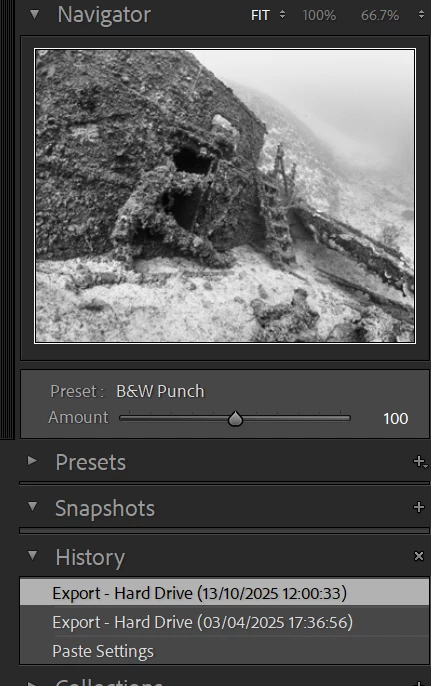
AndyBo_0-1765206644936.png

I cannot even see the import to go back to it.

Lr obviously has them - hence "Paste", but no steps, but a couple of Exports


There were no messages when it updated.

I restored an old version and updated again - the same result, including no messages.


I want my history or at least to go back to the Import

Correct answer JohanElzenga
quote

Now to import nine months worth of photos and reprocess them🤔 🤔


By @AndyBo


Don't do that! Instead, open the catalog with those photos and export only those photos as a new catalog. Then import this into the catalog you just salvaged.


2 replies

AndyBoAuthor
December 9, 2025

I have found a catalogue in the corrupt catalogue directory that is contemporaneous with the date of the images that had the missing data and low all the edits are there. 

The corrupt catalogue(s) open correctly and upgrade to 15

Something in this must have deleted the history.

Now to import nine months worth of photos and reprocess them🤔 🤔

JohanElzenga
Community Expert
JohanElzengaCommunity ExpertCorrect answer
Community Expert
December 9, 2025
quote

Now to import nine months worth of photos and reprocess them🤔 🤔


By @AndyBo


Don't do that! Instead, open the catalog with those photos and export only those photos as a new catalog. Then import this into the catalog you just salvaged.


-- Johan W. Elzenga
AndyBoAuthor
December 9, 2025

Thanks for the great idea Johan

dj_paige
Legend
December 8, 2025

Somehow you pasted settings into this photo, and it overwrites the settings that present. This is unrelated to upgrading the catalog. If the settings were gone in the backup before the upgrade, than it is something that has happened before the upgrade.


Try looking in the oldest backup you have.


AndyBoAuthor
December 9, 2025

Hi,

I have gone back to my oldest backup - April 25

And every photo I have looked at from my February trip says "Paste settings" - and this was nothing I would have done.

My older photographs have no history whatsoever

dj_paige
Legend
December 9, 2025

I don't know what happened, but obviously this has nothing to do with upgrading your catalog file. "Paste Settings" appears because you (probably accidentally) instructed Lightroom Classic to do something. LrC doesn't put that into your history by itself.