
amandar33173544
Participating Frequently
June 11, 2018
Answered

User Presets: RAW v JPEG

  • June 11, 2018
  • 3 replies
  • 4177 views

Hi all

I have recently created my own User Presets to help with editing my own photos to my style, or at least attempting to create my own style.

I have a Canon M5 that shoots Raw and Jpeg files.  I also shoot with an iPhone 8plus and GoPro, mainly in .jpeg format.

When importing these photos into Lightroom, I have found that I can't use presets created originally on RAW files on my Jpeg files, but can use any preset created from a jpeg file on a raw file.

Is this correct?

Is there a way of using the preset across both file formats?

I am also using MacOS and the latest version of Lightroom Classic.

Any help would be greatly appreciated.

Thanks

Amanda
    This topic has been closed for replies.
    Correct answer Rob_Cullen

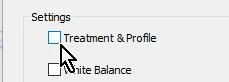
    When you create the preset, uncheck the [Treatment & Profile] box.

    3 replies

    Participant
    December 27, 2019

    Where are these Settings check boxes in Camera Raw ?

    Rob_Cullen
    Community Expert
    Rob_CullenCommunity ExpertCorrect answer
    Community Expert
    June 11, 2018

    When you create the preset, uncheck the [Treatment & Profile] box.

    Regards. My System: Windows-11, Lightroom-Classic 15.3, Photoshop 27.5, ACR 18.3, Lightroom 9.3, Lr-iOS 10.4.0, Bridge 16.0.3 .
    amandar33173544
    Participating Frequently
    June 13, 2018

    Thank you.  This worked.  Appreciate all the help! 

    Thanks

    Amanda

    JP Hess
    Inspiring
    June 11, 2018

    If the preset involves assigning a camera profile that is raw-specific than that preset can only be used on a raw image. However, as far as I know, that would be the only limiting factor. For instance I have lens sharpening presets for my different lenses that don't involve camera profiles, and I can use those presets on either raw or JPEG images. So I think it would depend on what settings are included in the preset.