Harald De Luca
Known Participant
August 27, 2026
Question

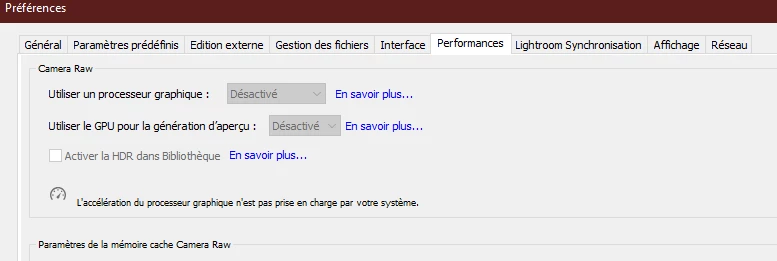
Version 15.5 no longer seems to support my RTX 3070 GPU, whereas the previous version did.

  • August 27, 2026
  • 12 replies
  • 129 views

It's all in the title. But here's a screenshot of the problem.

Because of this problem, local AI functionality is much slower.

I have already tried the troubleshooting steps on the troubleshooting page, but without success.

This is intolerable considering that I pay for the subscription to this software.

I've attached my dxdiag file.

I'm also experiencing the same issue with Camera Raw versions 18.4.1 through 18.6. Only Camera Raw 18.4 still works correctly. And my NVIDIA driver is fully up to date with version 616.56, released yesterday.

12 replies

danielm49702136
Participating Frequently
August 31, 2026

I have had the same problem with rtx3070 on a notebook. I has been solved after updating the nvidia driver to the last studio version and the intel video driver which works in conjunction with nvidia

johnrellis
Legend
August 27, 2026

[View this post in your web browser. It contains formatting and images that don't appear in email.]


To explicitly confirm, you tried deleting the file Camera Raw GPU Config.txt as described in steps 2 - 5?

https://helpx.adobe.com/lightroom-classic/kb/troubleshoot-gpu.html#solution-4


(It’s important to double-check precisely what steps you’ve done, because too often people say “I’ve done everthing” when they haven’t.)


 do a clean reinstallation of this version.


See here for how to do a clean installation:

https://www.dell.com/support/kbdoc/en-th/000190215/installing-nvidia-video-drivers-with-the-clean-installation-option


I suggest doing a clean installation of the most recent Studio driver first, and if that doesn’t work, then do a clean installation of 596.36 as recommended by ​@AxelMatt.


Harald De Luca
Known Participant
August 28, 2026

Yes, I had already tried that scenario (deleting the Camera Raw GPU Config.txt file). But without success.

I'll keep my installation clean. Up until now, I've been doing quick installations on top of it. Rarely a clean installation. We'll see if that makes a difference.

Also, if I still have the problem that I have to downgrade to 596.36, it's annoying because I lose the optimizations for ComfyUI that I use very regularly.

Community Expert
August 27, 2026

@Harald De Luca wrote: And my NVIDIA driver is fully up to date with version 616.56, released yesterday.


Several users reports issues with Nvidia’s graphic driver of the 6xx.xx versions.

Try to go back to version 596.36 (Studio version). This is the last version without any known issues.

Donwload this driver and do a clean reinstallation of this version.


My System: Intel i7-8700K - 64GB RAM - NVidia Geforce RTX 3060 - Windows 11 Pro 25H2 -- LR-Classic 15 - Photoshop 27 - Nik Collection 9 - PureRAW 6 - Topaz Photo AI
Harald De Luca
Known Participant
August 28, 2026

Before downgrading to the driver version you recommended, I have two questions: Why does Camera Raw version 18.4.0 still work perfectly, while the latest versions don't in the most recent driver updates?
And which of the two development groups is responsible for releasing a patch to ensure everyone works with their latest version? Adobe or NVIDIA?

Community Expert
August 28, 2026

...
And which of the two development groups is responsible for releasing a patch to ensure everyone works with their latest version? Adobe or NVIDIA?

This hard to say. But, as I already read in other forums many users have issues with drivers of the 610.xx version. And this issues depends other application than Adobe’s software.

However, I wouldn't rule out the possibility that Adobe software also has problems in this area. 

My System: Intel i7-8700K - 64GB RAM - NVidia Geforce RTX 3060 - Windows 11 Pro 25H2 -- LR-Classic 15 - Photoshop 27 - Nik Collection 9 - PureRAW 6 - Topaz Photo AI
dj_paige
Legend
August 27, 2026

Try the troubleshooting steps at 


Harald De Luca
Known Participant
August 27, 2026

The links lead to what I've already tried. And nothing helped in my case.

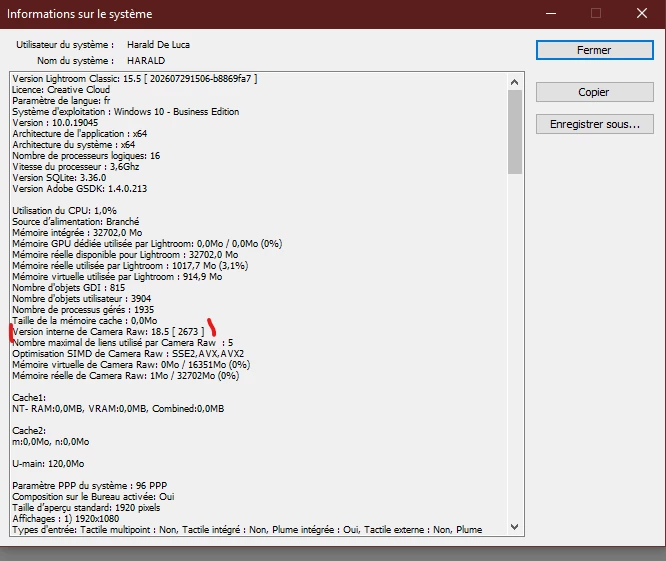
However, I can add the system info file retrieved from Lightroom.

And I don't have a "TempDisableGPU2" or "TempDisableGPU3" file in my folder

Same for Camera RAW

I am also attaching the Camera RAW 18.6 logs to show that something is not working.

As well as the logs for version 18.4, which is working. You'll see that there are differences.

Honestly, I really don't know what else to do to get the latest versions of Camera Raw working, since none of the troubleshooting steps I've tried have solved my problem.