Participant
November 29, 2023
Question

Version confusion: One catalog Two macs

  • November 29, 2023
  • 1 reply
  • 110 views

How to save catalog to work with version 6.5 on two macs?

Since recent update my home MacBook (running Big Sur) cannot update to latest LRC version.

Had to roll back office Mac Mini (Ventura) to version 6.5 so both computers can open same catalog which is stored on external drive.

Trouble now is that Mac Mini (ver 6.5) still wants to "upgrade" the shared catalog to even open it. Also a new catalog version it created (with "-v13" suffix) which cannot be opened on Macbook.

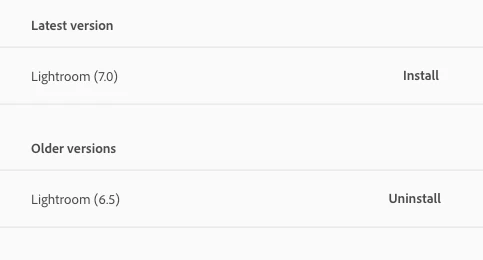
Also creative cloud app (Mac Mini) lists only versions available as 6.5 (installed) and 7.0 but in the "About Lightroom Classic" dialog it says "13.0.1 Release"


Creative Cloud LRC versions on Mac Mini (Ventura):
This topic has been closed for replies.

1 reply

dj_paige
Legend
November 29, 2023

You seem to be confusing Lightroom Classic (version 13 or higher) with Lightroom (not Classic) which is currently at version 7.


Which software are you really discussing? I assume it is Lightroom Classic, in which case you need to have version 13 on both computers (or possibly version 12 on both computers).


Your screen capture (indicating in the words you typed above it) says LrC, but it does not show LrC, it shows Lightroom (not Classic). Since Adobe has chosen these confusing names for the software, you must be very precise about what you are looking at.

Participant
November 29, 2023

Doh! I've been using Lightroom Classic exclusively but installing/updating the wrong program (Lightroom). Got rid of LR now and rolled back LRC to ver 12.5.1 should be ok now. Thanks!