[This post contains formatting and embedded images that don't appear in email. View the post in your Web browser.]
LR doesn't include "python3". The built-in Aperture/iPhoto Importer Plugin runs Python scripts, but it relies on the standard version of Python included with Mac OS. (The plugin doesn't run on Windows.)
LrTasks.execute() runs its scripts in an environment with a default PATH variable that's not the PATH set by your login shell. So you're getting the default Mac OS "python3" (3.9.6 on Mac OS 15).
You can see this explicitly by placing the following Lua script "which-python.lua" in the Lightroom Scripts folder:
~/Library/Application Support/Adobe/Lightroom/Scripts
restarting LR, and then doing the menu command Scripts > which-python. It will show this:
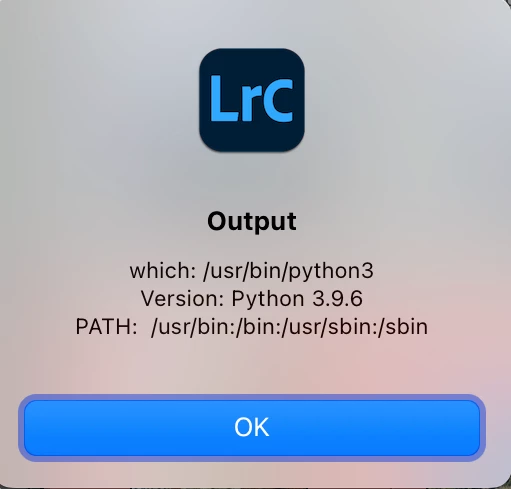
So your LrTasks.execute() will have to explicitly set a different PATH or refer to the absolute path of the desired "python3".
which-python.lua:
local LrDialogs = import "LrDialogs"
local LrFileUtils = import "LrFileUtils"
local LrPathUtils = import "LrPathUtils"
local LrTasks = import "LrTasks"

LrTasks.startAsyncTask (function ()
    local out = LrPathUtils.standardizePath ("~/Desktop/out.txt")
    local cmd = "(/bin/echo -n 'which: '; which -a python3; " ..
        "/bin/echo -n 'Version: '; python3 -V; " ..
        "/bin/echo 'PATH: ' $PATH) >" .. out
    LrTasks.execute (cmd)
    LrDialogs.message ("Output", LrFileUtils.readFile (out))
    end)




 AdChoices