


Very, very high CPU usage, since version 13 (now using 14.0.1)
I have been a subscriber to the Lightroom/Photoshop package for over 6 years.
I currently use it on two computers, a Mac Mini 2023 and for a little over 6 months, on a Macbook Pro 2019, Core I9 with 16GB of RAM.
On this Macbook Pro 2019, Core I9 with 16GB of RAM, it is IMPOSSIBLE to use Lightroom currently.
Over 1400% CPU usage sometimes, never less than 200% !!!!
(see image below)
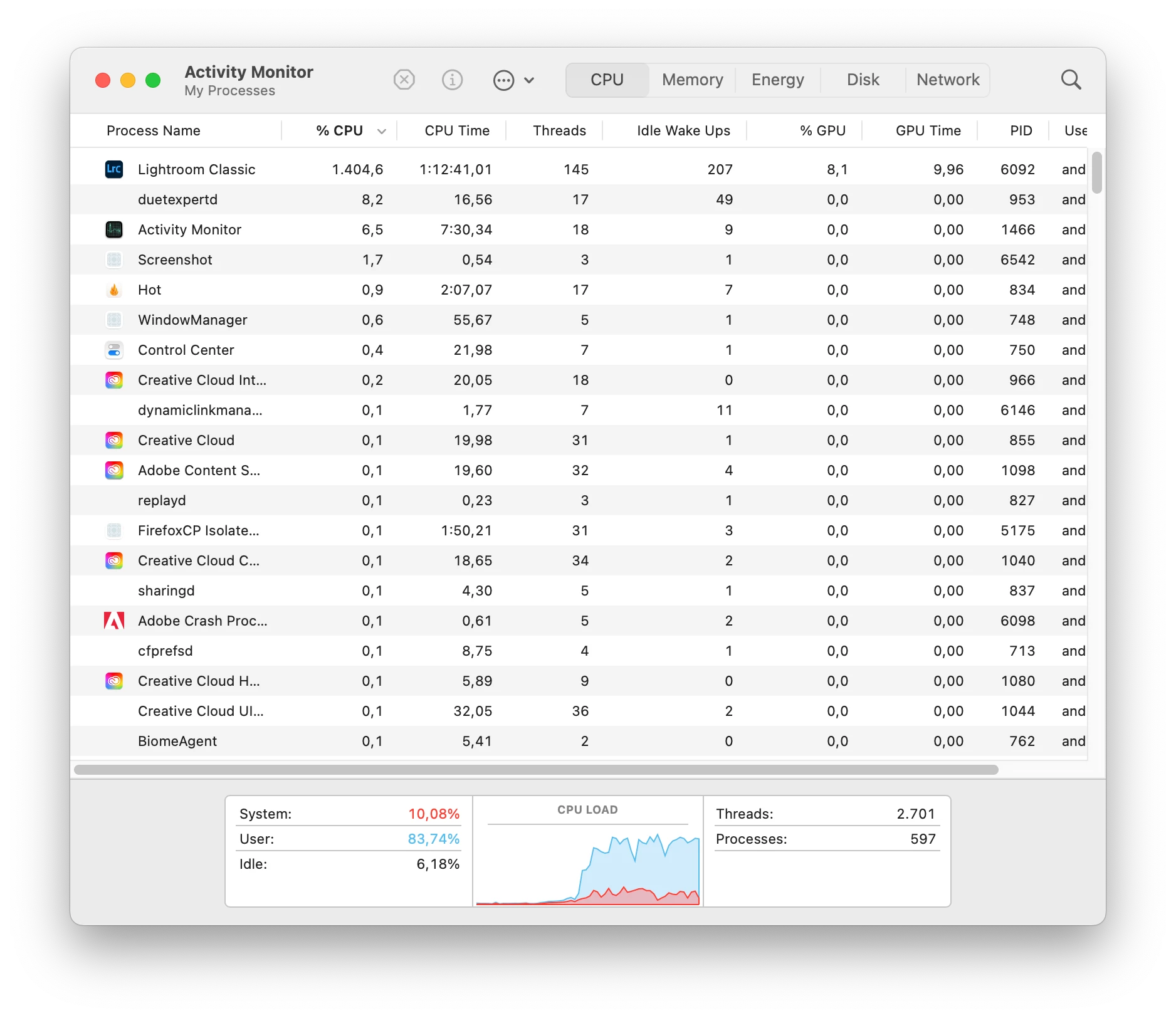
I had an old Macbook Pro 2014, I7 with 16GB of RAM. Last year, with the latest versions of Lightroom, the performance was terrible, but it worked bravely. Due to lack of money (Brazilian photographer, poor South American!), I bought a Macbook Pro 2019, Core I9 with 16GB of RAM. The performance is 1000x worse!
This 2019 model must be Apple's biggest failure!
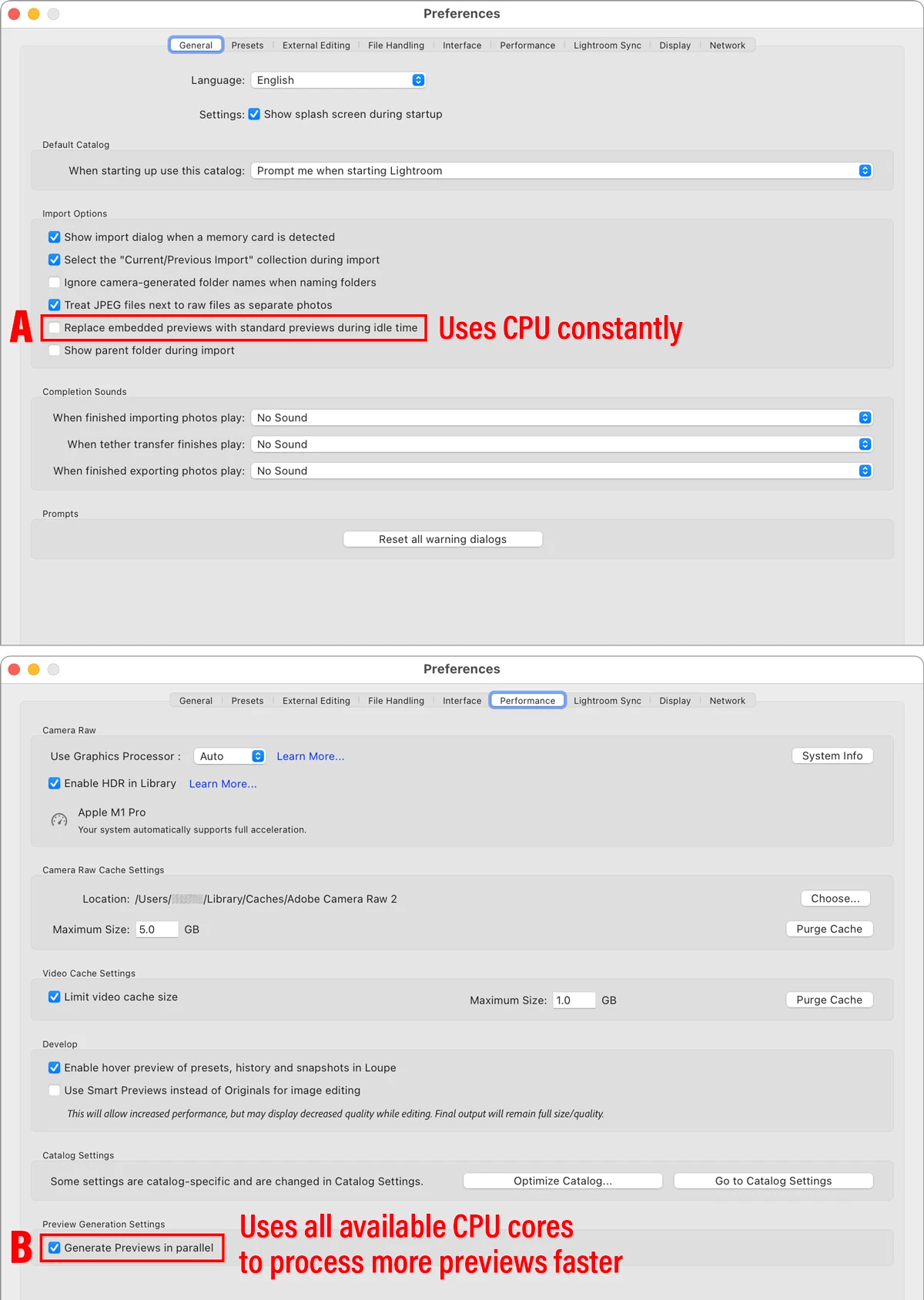
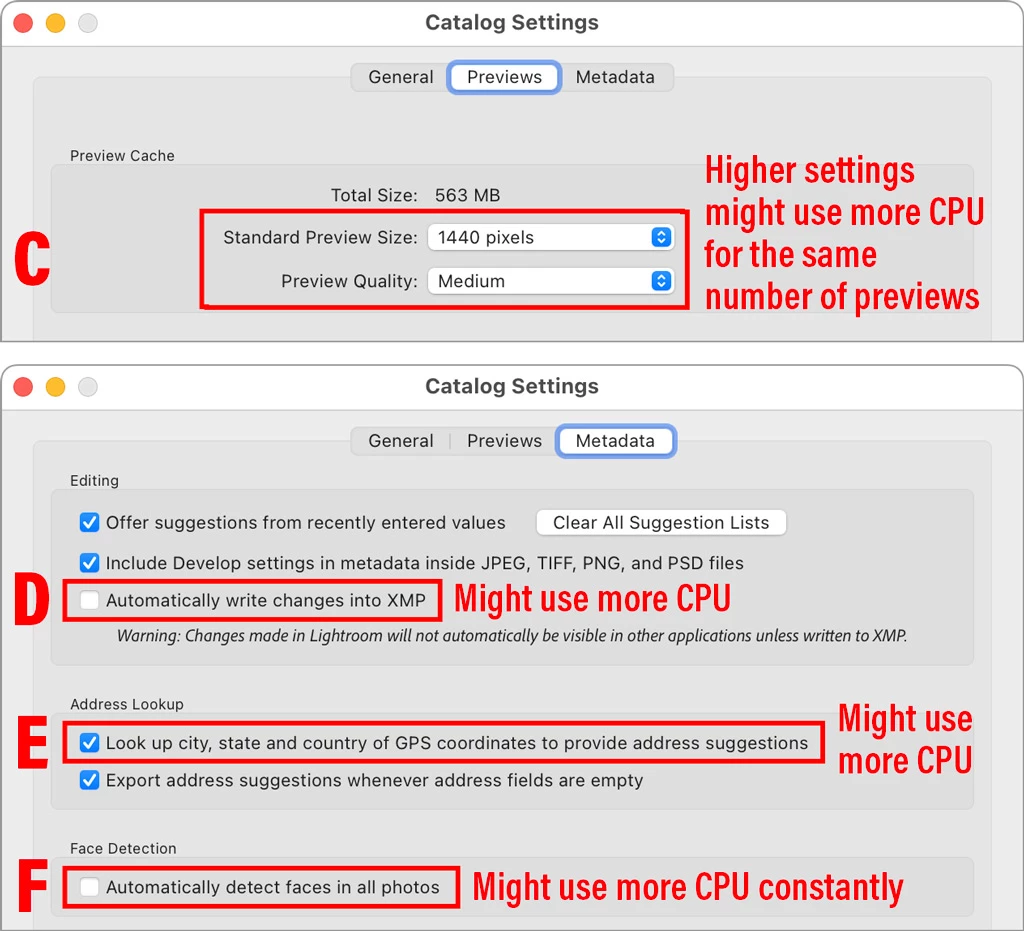
Does anyone have any ideas to improve this performance?
See below my System Info:
Lightroom Classic version: 14.0.1 [ 202410161356-30922cfc ]
License: Creative Cloud
Language setting: en-BR
Operating system: Mac OS 15
Version: 15.0.1 [24A348]
Application architecture: x64
Logical processor count: 16
Processor speed: 2,3GHz
SqLite Version: 3.36.0
Power Source: Plugged In, 80%
Built-in memory: 16.384,0 MB
Dedicated GPU memory used by Lightroom: 3.517,2MB / 4.080,0MB (86%)
Real memory available to Lightroom: 16.384,0 MB
Real memory used by Lightroom: 1.730,5 MB (10,5%)
Virtual memory used by Lightroom: 46.131,8 MB
Memory cache size: 345,2MB
Internal Camera Raw version: 17.0 [ 2043 ]
Maximum thread count used by Camera Raw: 5
Camera Raw SIMD optimization: SSE2,AVX,AVX2
Camera Raw virtual memory: 566MB / 8191MB (6%)
Camera Raw real memory: 827MB / 16384MB (5%)

Cache1:
Final1- RAM:471,0MB, VRAM:1.419,0MB, 20241124_103225_DSC1354.nef
NT- RAM:471,0MB, VRAM:1.419,0MB, Combined:1.890,0MB

Cache2:
m:345,2MB, n:298,0MB

U-main: 73,0MB

Standard Preview Size: 3584 pixels
Displays: 1) 3584x2240

Graphics Processor Info:
Metal: AMD Radeon Pro 5500M
Init State: GPU for Image Processing supported by default
User Preference: Auto
Enable HDR in Library: OFF

Application folder: /Applications/Adobe Lightroom Classic
Library Path: /Users/andre/Pictures/catalogo-BiaStorino_LOCAL/catalogo-BiaStorino_LOCAL.lrcat
Settings Folder: /Users/andre/Library/Application Support/Adobe/Lightroom

Installed Plugins:
1) AdobeStock
2) Aperture/iPhoto Importer Plug-in
3) Flickr
4) HDR Efex Pro 2
5) JPEGmini
6) Nik 6 HDR Efex
7) ON1 NoNoise AI 2022
8) ON1 Photo RAW 2021
9) ON1 Photo RAW 2024
10) ON1 Resize 2021
11) Plugin Parameters

Config.lua flags:

 AdChoices