
Participating Frequently
January 11, 2023
Answered

"visible on map" filter is gone

  • January 11, 2023
  • 1 reply
  • 318 views

There used to be a fifth context-related filter on my second screen in grid mode providing me with a quick "visible on map" filter when I had map mode active. This seems to have been removed (maybe since Version 12? currently tested in 12.0 and 12.1) and I have to work around this by going into metadata and select map position --> current map position.

Please bring back the quick filter, as it is easier & quicker to apply.
This topic has been closed for replies.
Correct answer johnrellis

[This post contains formatting and embedded images that don't appear in email. View the post in your Web browser.]


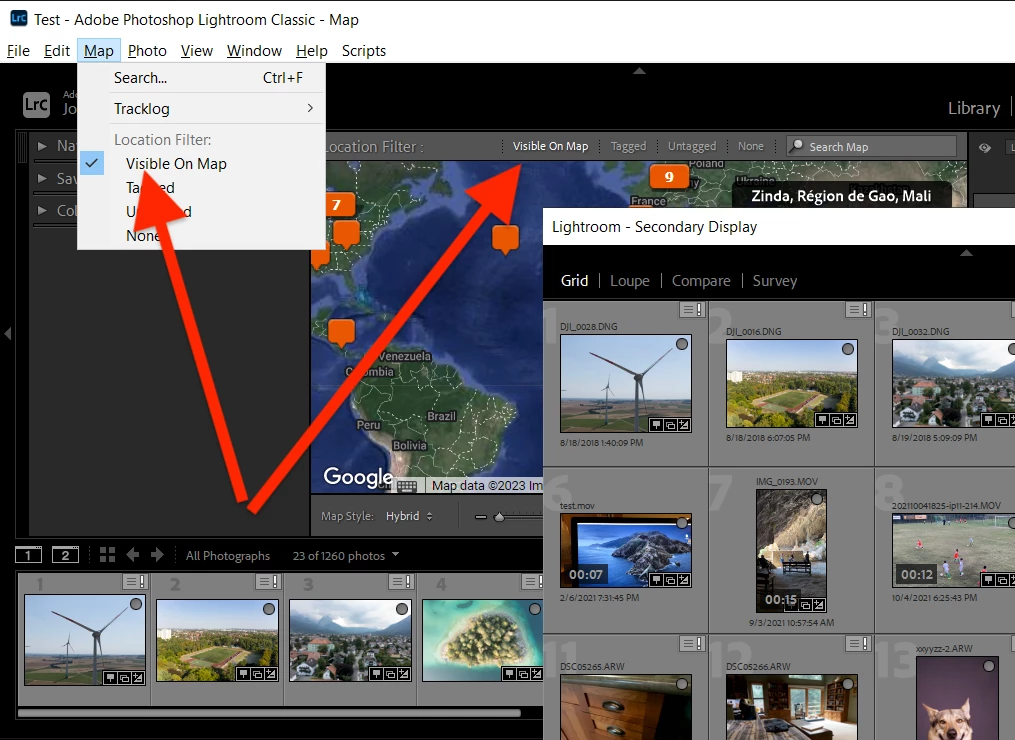
Do you not see the Location Filter bar at the top of the Map module with Visible On Map? Or the Map menu item Visible On Map?


If you don't see the Location Filter bar, do the menu command View > Show Filter Bar (keyboard shortcut shown on menu).

1 reply

johnrellis
johnrellisCorrect answer
Legend
January 11, 2023

[This post contains formatting and embedded images that don't appear in email. View the post in your Web browser.]


Do you not see the Location Filter bar at the top of the Map module with Visible On Map? Or the Map menu item Visible On Map?


If you don't see the Location Filter bar, do the menu command View > Show Filter Bar (keyboard shortcut shown on menu).

Participating Frequently
January 11, 2023

legend 😊🙏
it was the filter bar which was missing. maybe this is now hidden as default with V12 or i accidentally hit the shortcut, however when updating to 12.1 it stayed hidden.

johnrellis
Legend
January 11, 2023

Glad it was easy to resolve.  Upgrades generally preserve your current settings, so if it was hidden in 12.0 for some reason, it would remain hidden in 12.1