


Inspiring
September 25, 2026
Question

Web Album cannot be saved

  • September 25, 2026
  • 3 replies
  • 28 views

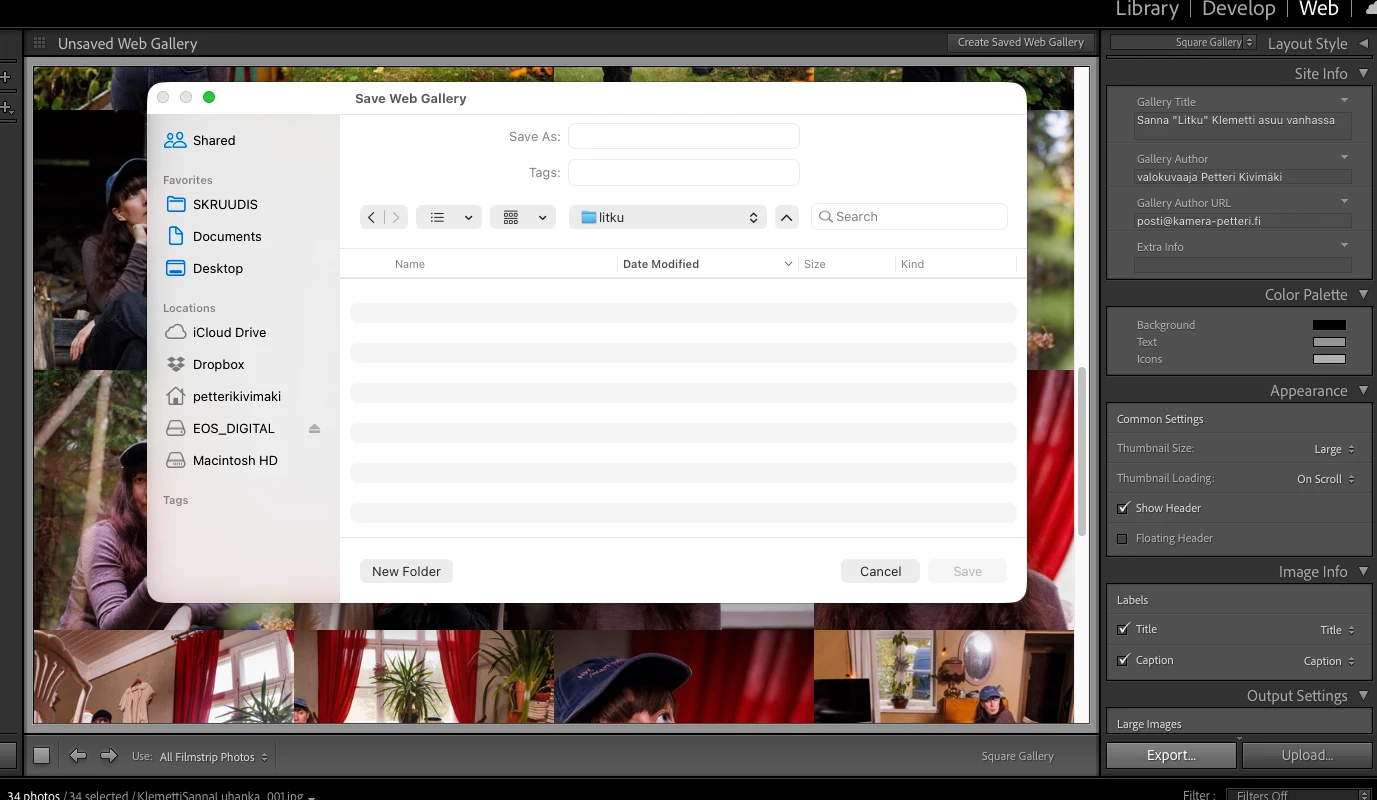
QED: Updating Adobe CC apps can ruin the whole thing. This time it is to me the very essential Web module, which does allow saving the album at all. Nope: You do not save! 

So the Web module allows to  compose album normally, but without any reason the saving is disabled and the whole Web module thus useless.

Macbook Pro M1 Max, MacOS Golden Gate 27.0 and Lightroom Classic 15.5.1
 

    3 replies

    Inspiring
    September 25, 2026

    Hi again! Now it works: I did reset the album preferences plus removed quotes from the Gallery title or headline and now the saving of the album is allowed.

    Inspiring
    September 25, 2026

    Hi and thank You for Your quick response. My workflow is very normal and it has worked since the very beginning of LR Web Module - and before that the Bridge web module. So I import the 10-50 images with File info’s added in Bridge and then create an album of the imported images. Everything works, except saving disabled, as seen in the image.

    The only thing that has changed is that I got a

    new Macbook Pro M1 Max, with MacOS Golden  Gate. The problem appeared after that came.

    Sameer K
    Community Manager
    Community Manager
    September 25, 2026

    Hey, @Sika-Petteri. Welcome to the Lightroom Classic Community. I'll need more information to help you with this. There is no known intentional change that disables saving in the Web module.


    Could you record your workflow in a video and share it with us?


    Thanks!
    Sameer K
    (Type '@' and type my name to mention me when you reply)