

Central Standard
Known Participant
April 27, 2022
Answered

Weird File Names When Saving Photoshop tp Lightroom

  • April 27, 2022
  • 2 replies
  • 1049 views

Hello,


I hope everyone is doing well. 


Typically what I do is edit a phot in Lightroom, send the raw file (nef) to Photoshop for some edits and using the save in the dropdown menu, save the file back to Lightroom as a tif. Until recently the tif from Photoshop to Lightroom would be named filename-edit.tif, or something like that. A rather simeple name.


Recently, the image saved back to Lightroom from Photoshop is named bunchofnumbersfiilenamebunchofnumbersxmorenumbers.tif. The "bunch of numbers" appears to be related to the image size in pixels and perhaps some random numbners thrown in for fun..


I would like to have Photoshop save the image to filename-edit.tif. Can someone point me to some setting, presumably in Photoshop, where I can get that simple name out-put?  I am not sure what I may have changed.  


I'm using Release 11.1 (not the one that was issued in ther last 24 hours) on a Windows 10 computer.


Thank you,


Greg J
This topic has been closed for replies.
Correct answer Conrad_C

@Central Standard wrote:

Thank you for responding. I am not sure I have the right file naming screenshot. 


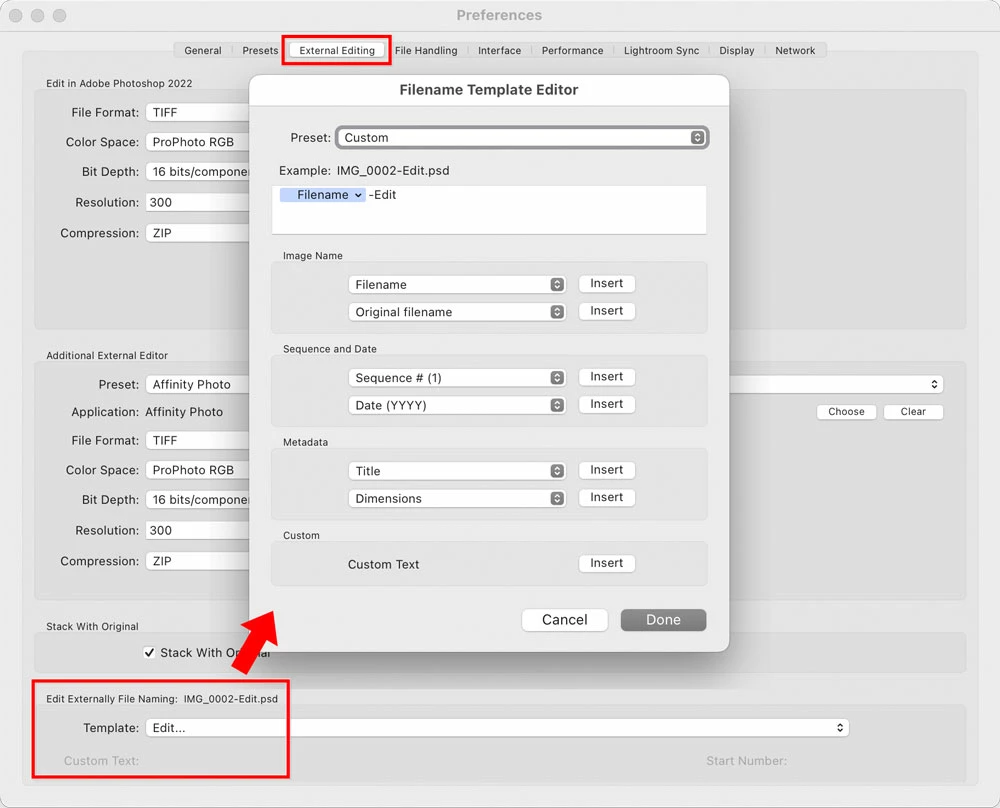
Does this view of it help you find the source of the file naming format for external editing? You get there from the Preferences dialog box, not the Import dialog box.


2 replies

josephlavine
Community Expert
Community Expert
April 28, 2022

I recommend creating a custom file name to see whether that addresses your issue. It appears to be pulling the naming convention from somewhere, which should override the problem.

warmly/j

Rob_Cullen
Community Expert
Community Expert
April 27, 2022

Go to your LrC Preferences > External Editing tab,  and show us what you have in the 'Naming' panel with a screen-clip.

And you could also 'Edit' this Template to show us the how it is designed.


Regards. My System: Windows-11, Lightroom-Classic 15.1.1, Photoshop 27.3.1, ACR 18.1.1, Lightroom 9.0, Lr-iOS 10.4.0, Bridge 16.0.2 .
Central Standard
Known Participant
April 28, 2022

Rob,

Thank you for responding. I am not sure I have the right file naming screenshot. 

Greg J


Rob_Cullen
Community Expert
Community Expert
April 28, 2022

Your External Editing 'File Naming' Template is set to [Custom Settings]  BUT What are the Custom Settings?

In a File rename templare editor- You may need to select [Edit] at the very bottom of the Template drop-down menu, design a Template and save it, (with a Template name) such as [Filename-Custom].

Then in the [Custom Text] field in the External Editors Preference dialog- Choose the "Filename- Custom" template, and add the suffix you want added to the files from Photoshop (eg. "Edit").

Specifically defining the "Template:" may be required to fix your problems with filenames.


Regards. My System: Windows-11, Lightroom-Classic 15.1.1, Photoshop 27.3.1, ACR 18.1.1, Lightroom 9.0, Lr-iOS 10.4.0, Bridge 16.0.2 .