Participant
June 14, 2022
Question

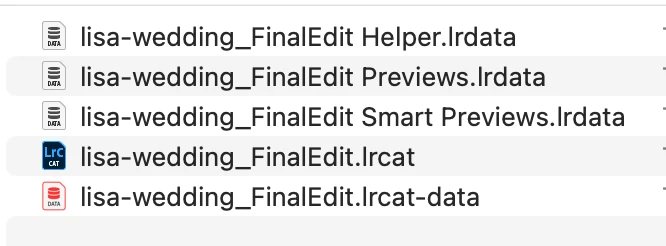
What are all the files after exporting the catalog?
  • June 14, 2022
  • 2 replies
  • 114 views

What are the "Helper", "Previews", and .lrcat-data files for?

This topic has been closed for replies.

2 replies

JohanElzenga
Community Expert
Community Expert
June 14, 2022

The Helper file contains information Lightroom uses but does not store in the catalog itself. It holds cached data to help performance, like folder information. Previews are the images you look at when you look at your photos in Lightroom. Lightroom does not alter the original images, so in order to show you what your edited image looks like, it creates a preview and that is what you are looking at. Do not delete these files for no reason, because that will only slow you down.


-- Johan W. Elzenga
dj_paige
Legend
June 14, 2022

Helper and Previews can be deleted if you want, Lightroom Classic will re-create them as needed. Smart-Previews are something that you asked LrC to create, they contain the Smart Previews; if you no longer want the Smart Previews then this file can be deleted. 


Lrcat-Data should not be deleted and should stay with the .LRCAT file; this contains information needed by the new masking feature.