maltje1962
Inspiring
January 9, 2024
Answered

What iso in lightroom?

  • January 9, 2024
  • 2 replies
  • 951 views

Is there a possibility to look for all photo's with iso higher then 500 for example?

How?


Kind regards

This topic has been closed for replies.
Correct answer dj_paige

Use the Filter Bar in the Library Module in Grid view.


First, press \ to turn on the Filter Bar (if it is not already on)

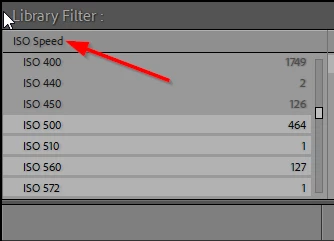
Next set the first dropdown to ISO Speed

Click on 500

Shift click on the highest ISO speed shown
 

2 replies

dj_paige
dj_paigeCorrect answer
Legend
January 9, 2024

Use the Filter Bar in the Library Module in Grid view.


First, press \ to turn on the Filter Bar (if it is not already on)

Next set the first dropdown to ISO Speed

Click on 500

Shift click on the highest ISO speed shown


maltje1962
Inspiring
January 9, 2024

Thanks very much

maltje1962
Inspiring
January 9, 2024

Now that I have all my photo with iso 500 and above,is it possible to select them all and than go to develope module for decrease the distortion just with one click?

Sean McCormack
Community Expert
Community Expert
January 9, 2024

ISO is an option in both the Filter Bar or in Smart Collection criteria. For the Filter Bar, Choose Metadata and ISO Speed Rating. For Smart Collections, it's under Camera Info. 


Sean McCormack. Author of 'Essential Development 3'. Magazine Writer. Former Official Fuji X-Photographer.
maltje1962
Inspiring
January 9, 2024

How can I get iso in the top row?

F. McLion
Community Expert
Community Expert
January 9, 2024

Detailed explanation here: https://helpx.adobe.com/lightroom-classic/help/finding-photos-catalog.html

Also, Google returns dozens of videos regarding this topic.

--- Got your issue resolved? Please label the response as 'Correct Answer' to help your fellow community members find a solution to similar problems. ---