araza35817949
Participant
September 27, 2017
Answered

What should i do to keep exported photo above 2mb min?

  • September 27, 2017
  • 2 replies
  • 952 views

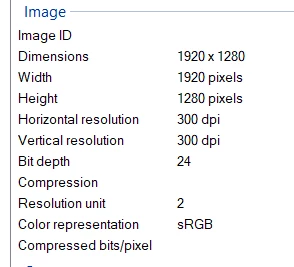
I dont know if the headline is correct but, the problem is i am trying to send photo to a competition. their requirements are:

Raw file: 28mb

Edited and exported file: 1.12mb

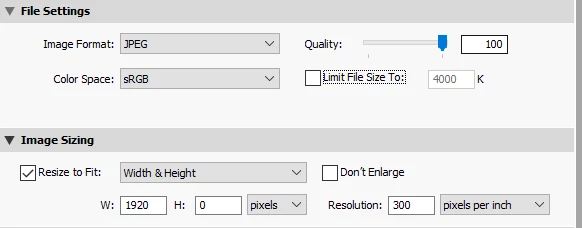
this is how i export

My questions are:

1. what i am actually doing wrong?

2. how i am gonna set 7-12 compression quality?

3. How i am gonna keep it between 2-4mb with this settings?

Thank you

This topic has been closed for replies.
Correct answer dj_paige

araza35817949  wrote

I dont know if the headline is correct but, the problem is i am trying to send photo to a competition. their requirements are:

Unfortunately for you, the requirement that the size be not less than 2 MB and more than 4MB is utter nonsense. The requirements of dpi is nonsense. The requirement of specifying a maximum edge size in pixels, along with a dpi or ppi requirement, is nonsense. It obviously means that whoever wrote these requirements doesn't understand a key aspect of digital photography, that JPGs are compressed and that compression can produce different sizes on different pictures and so the file sizes are meaningless.

2. how i am gonna set 7-12 compression quality?

I believe that 7–12 refers to the compression quality in the terms used in Photoshop or Photoshop Elements. In Lightroom, the quality slider above 70 would give you the same compression levels (I didn't do the math, maybe you can go below 70 but anyway, that's close enough).

3. How i am gonna keep it between 2-4mb with this settings?

Well what I would do is to complain that the requirements are nonsense, and ignore it. However, what you should do is probably different, you can set the width of the maximum edge to 3200 pixels, and see if that helps.

2 replies

dj_paige
Legend
September 27, 2017

Adding ... if setting the width of the export to a maximum edge of 3200 pixels causes an enlargement of the image, this actually LOWERS the quality of the image. I don't know if 3200 is an enlargement, it depends on the original size in pixels as the image came out of the camera.

dj_paige
dj_paigeCorrect answer
Legend
September 27, 2017

araza35817949  wrote

I dont know if the headline is correct but, the problem is i am trying to send photo to a competition. their requirements are:

Unfortunately for you, the requirement that the size be not less than 2 MB and more than 4MB is utter nonsense. The requirements of dpi is nonsense. The requirement of specifying a maximum edge size in pixels, along with a dpi or ppi requirement, is nonsense. It obviously means that whoever wrote these requirements doesn't understand a key aspect of digital photography, that JPGs are compressed and that compression can produce different sizes on different pictures and so the file sizes are meaningless.

2. how i am gonna set 7-12 compression quality?

I believe that 7–12 refers to the compression quality in the terms used in Photoshop or Photoshop Elements. In Lightroom, the quality slider above 70 would give you the same compression levels (I didn't do the math, maybe you can go below 70 but anyway, that's close enough).

3. How i am gonna keep it between 2-4mb with this settings?

Well what I would do is to complain that the requirements are nonsense, and ignore it. However, what you should do is probably different, you can set the width of the maximum edge to 3200 pixels, and see if that helps.

araza35817949
Participant
September 27, 2017

Thanks for understanding me   Competition is held by one of the biggest airline companies in europe so i am trying (actually struggling) to fit the reqs.

Oh thanx i think i confused bweteen widh and height. made it 3000x2000 and now its 2.8mb.

thanks