
Participating Frequently
April 21, 2026
Question

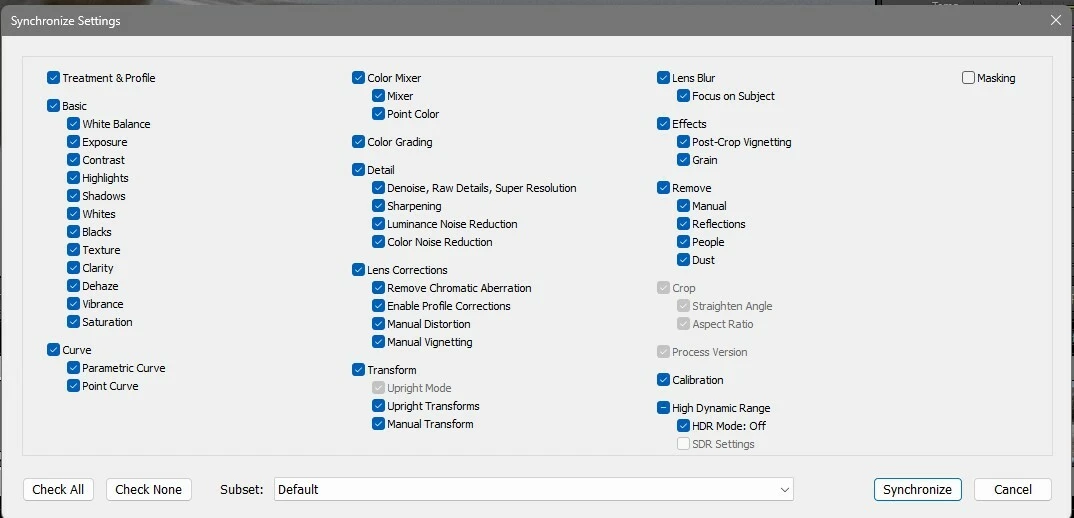
When attempting to sync settings in the develop module, the crop, straighten and aspect ratio selections are grayed out.

  • April 21, 2026
  • 1 reply
  • 22 views

When attempting to sync settings in the develop module, the crop, straighten and aspect ratio selections are grayed out. When I click on synchronize, the crop is applied but. If you don't want to synch the crop, there doesn't appear to be anyway to deselect that option.
 

    1 reply

    johnrellis
    Legend
    April 22, 2026

    [View this post in your web browser. It contains formatting and images that don't appear in email.]


    This was an undocumented design change in LR 15.0. When Upright Transforms is checked, then Crop is automatically checked and greyed out:

    I have no idea what motivated this change.


    So if you don’t want Crop copied, then uncheck Upright Transforms also.


    If want to copy Upright Transforms but not Crop, see here for several workarounds.